 Go up
Go up


Refining Your Business Search in SimplyMap
Posted on Jun 25, 2015 by Admin
In this week’s SimplyMap report, we review the different options available when searching for a business. The easiest and fastest method of mapping businesses or creating a business report is to use a keyword search. The keyword search function searches across several different criteria and returns all businesses related to your keyword. For example, if you did a keyword search for “seafood” you would return seafood restaurants, seafood markets, seafood shacks etc.
In this example, we’ll demonstrate how to refine your business search using an SIC code to get a targeted list of businesses in specific industries. The process of narrowing your business search involves applying additional conditions to your query.
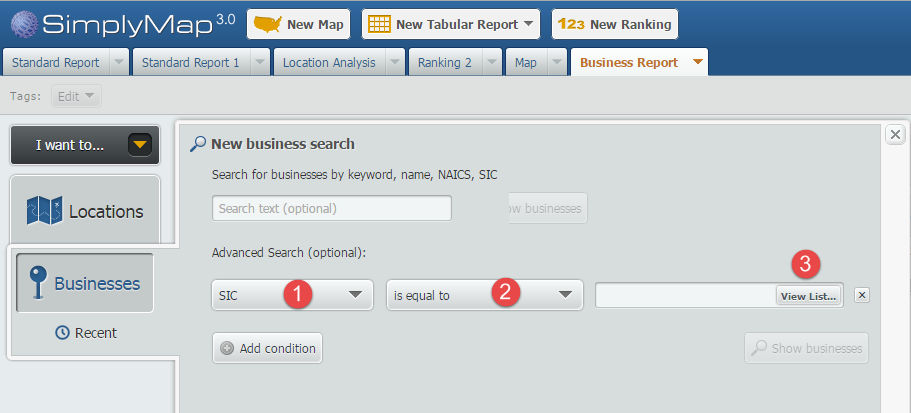
First choose your location; in this example we will use the city of Boston. Next, open the Businesses tab and select the “Add Condition” button. Set the first dropdown to SIC (1), the next to ”is equal to, (2)” and lastly select View List (3) to browse SIC codes.
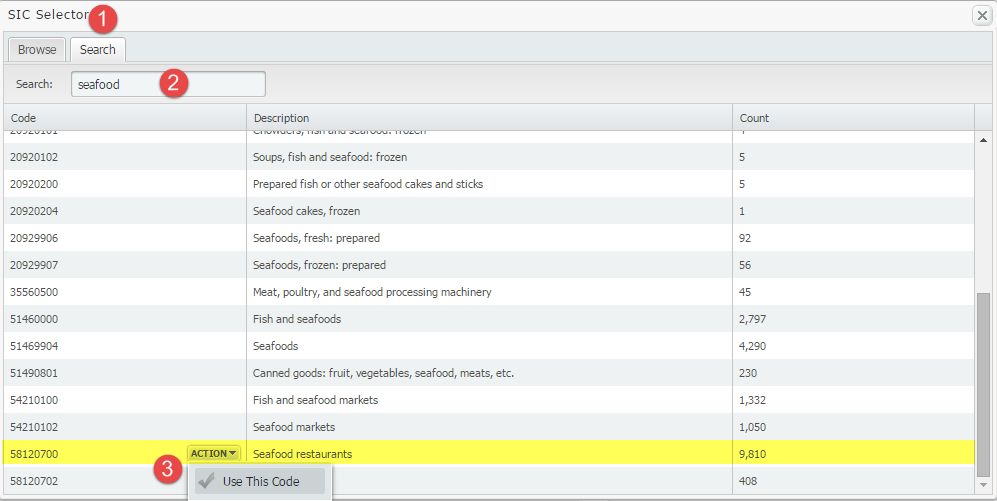
On the SIC selector screen, select the Search tab (1) to search for seafood (2). The screen will populate with results that have the word seafood in it. Mouse over“seafood restaurants” and select Use This Code (3).
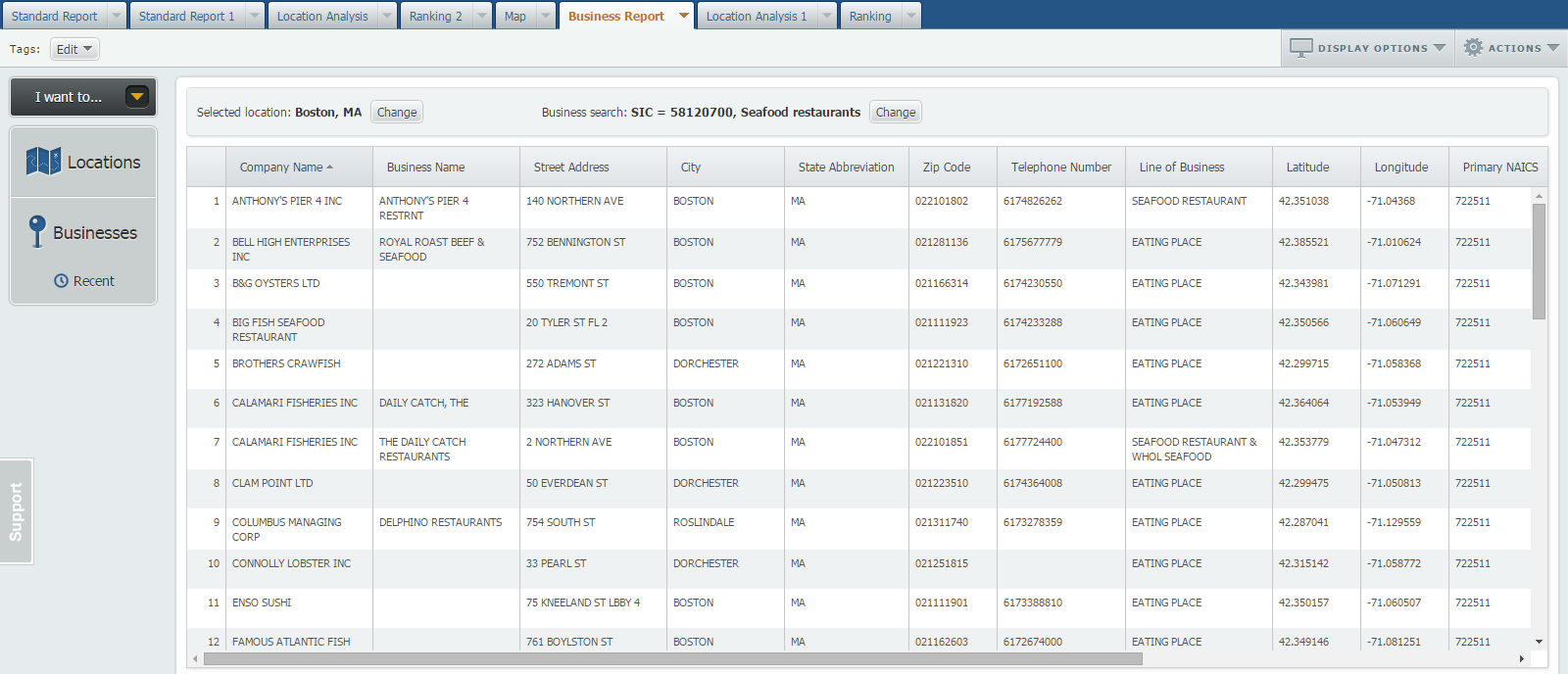
Select “Show Businesses” to populate your report using that specific code as the condition. Boston is home to 43 designated seafood restaurants - that’s not including seafood shacks or markets!
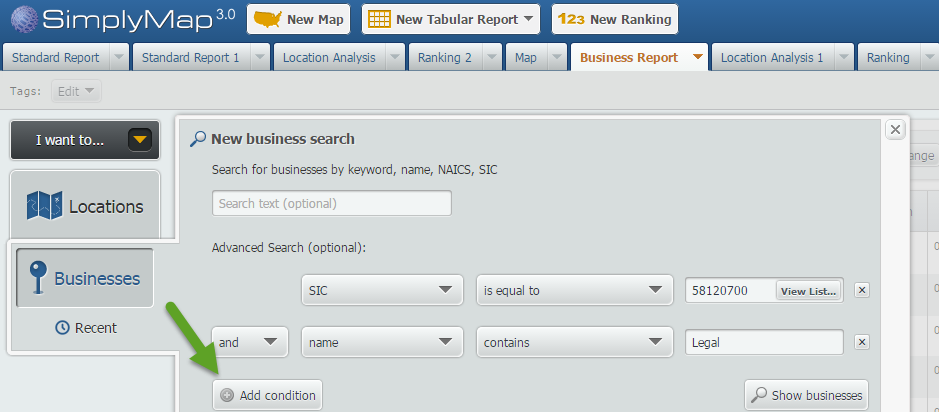
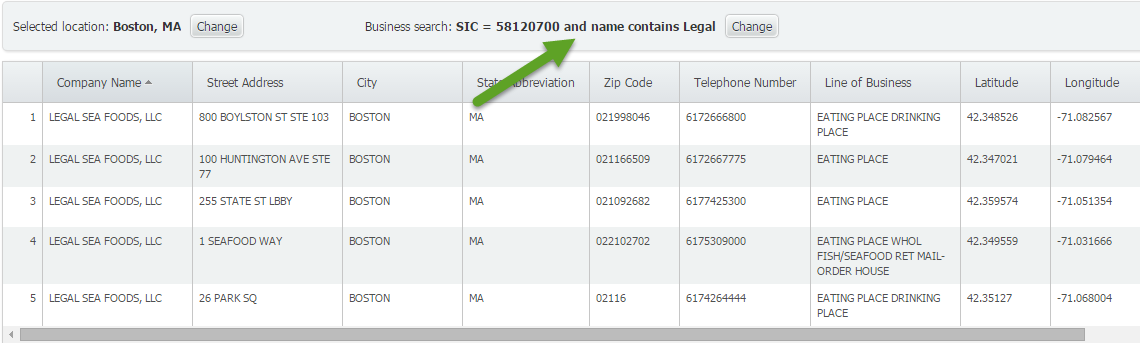
BONUS: SimplyMap lets you add multiple conditions. On the Businesses panel, you can add up to 4 total conditions by clicking on the “Add Condition” button and setting up conditions. In the image below, we set two conditions: the SIC code for seafood restaurants AND businesses which include “Legal” in their name.. This would then return the popular Boston seafood restaurants - Legal Seafood.
We hope you enjoyed this week’s SimplyMap report. Stay tuned for more SimplyMap tips and reports!
More from SimplyAnalytics


Posted on Feb 25, 2020 by Admin
SimplyAnalytics will be exhibiting at the PLA Conference, held this year at the Music City Center in Nashville, TN on February 26 - 28. Visit the team at Booth 1444 with your questions, f...
Posted on Apr 01, 2014 by Admin
Another fantastic series of workshops and events are planned at the SLA Conference on June 8-10th, 2014. Register now for networking and workshops throughout the week. Over 200 events are...
Posted on May 19, 2016 by Admin
Drop by booth #215 at the SLA 2016 conference to chat with us and get the latest info on SimplyMap. We look forward to seeing our customers, friends, and all others interested in learning...
Posted on Mar 11, 2024 by Admin
We're thrilled to announce that SimplyAnalytics will be exhibiting at the ALA Annual Conference in San Diego! We can't wait to connect with library professionals, share insights, and show...
Posted on May 10, 2016 by Admin
One benefit of data and applications like SimplyMap is the ability to visualize information. In this week’s report, we’ll take a quick look at some branding preferences in contiguous Amer...
Posted on Nov 23, 2012 by Admin
Men's Health magazine is charting vanity in US cities, with help from SimplyMap. What did they find? The Sunshine State, with a long history of going to great lengths to look good, tops t...
Posted on Dec 02, 2014 by Admin
Today we take a look at one of the more advanced features in SimplyMap - editing the map legend. Editing the map legend is a great way to not only customize how the data is distributed on...
Posted on Jun 02, 2017 by Admin
We can't wait for ALA Annual this Summer, and the opportunity to share SimplyAnalytics with the ALA community. Stop by the SimplyAnalytics booth (1339) and take a peak at what we've been ...
Posted on Oct 27, 2017 by Admin
Welcome to our first ever SimplyAnalytics blog! Every Friday we’ll post a write up on a specific feature or highlight some interesting data in SimplyAnalytics. The goal of these posts is ...
Posted on Jan 15, 2013 by Admin
The GRI team is looking forward to exhibiting at ACRL 2013 at the Indiana Convention Center in Indianapolis April 10 - 12, 2013. Every other year, ACRL offers its premier professional dev...