 Go up
Go up


Browsing & Searching for Businesses in SimplyAnalytics
Posted on Oct 27, 2017 by Admin
Welcome to our first ever SimplyAnalytics blog! Every Friday we’ll post a write up on a specific feature or highlight some interesting data in SimplyAnalytics. The goal of these posts is to make you more comfortable with the program and teach some interesting tips & tricks along the way.
Today we’ll take a look at the 3 methods of browsing and searching for businesses, and how to take advantage of each. Let’s get started!
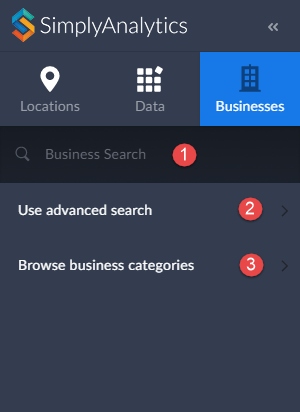
To overlay businesses onto a map or create a Business report, first ensure you have the Businesses tab selected as shown here.
As noted above, there are three ways of adding businesses.
1. A general keyword search
2. Advanced search / query
3. Browse by NAICS/SIC codes
Method #1 - General Keyword Search
The quickest and easiest method for adding businesses.
How to Use It - Simply type in a keyword such as “coffee” or a business name such as “Starbucks” in the available box shown above and hit enter on your keyboard.
Method #2 - Advanced Business Search
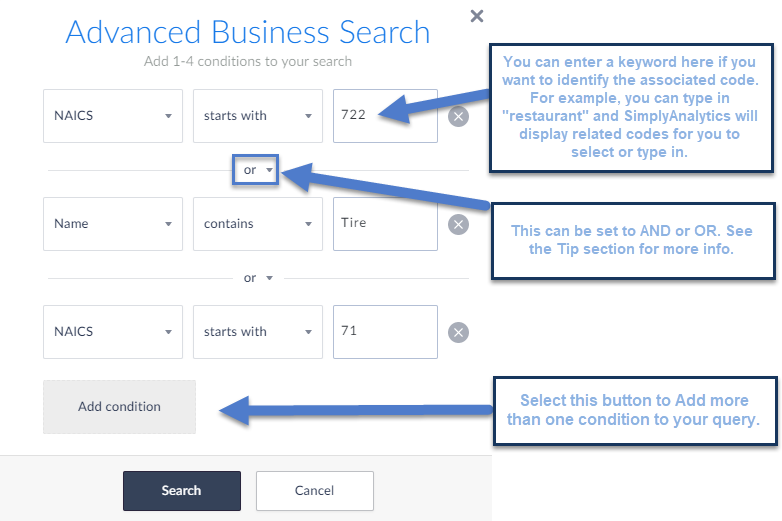
The most advanced method. This search allows you to build a business query using up to 4 total conditions. While this method is a bit more advanced, the tradeoff is you’re able to build a query to your specs.
How to Use It - select Use Advanced Search shown above, and from there you can build out your query. Below I am searching for NAICS starts with 722 (Food Services and Drinking Places) OR Name Contains: Tire OR NAICS starts with 71 (Arts & Entertainment).
Method #3 - Browse by NAICS/SIC Codes
If you want to browse for specific industry codes, this is your go to. This method allows you to jump into subcategories within a major industry so you’re able to browse for the code you had in mind.
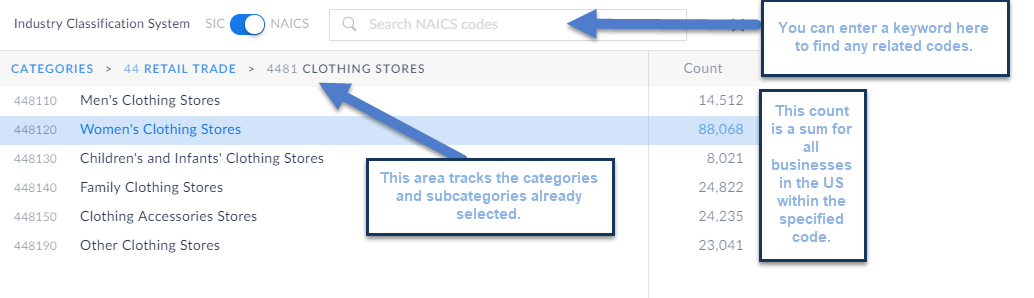
How to Use It - Select Browse Business categories and specify at the top if you are browsing for NAICS or SIC Codes (NAICS is the default). From there, you can jump into categories and subcategories by making an initial selection.
The example below went from: Retail Trade (44) to Clothing Stores (4481) and lastly within clothing stores you can specify which clothing store type you are looking for.
That’s it for our inaugural SimplyAnalytics blog post - we hope this post helped clarify the Business search. Stay tuned for more!
More from SimplyAnalytics


Posted on Nov 06, 2019 by Admin
Hello readers! We hope you’re having a wonderful week. Today we feature another entry from our From the Help Desk series. Let’s get started! Question: How do I analyze data for downtown? ...
Posted on Jan 27, 2015 by Admin
In this week’s report exploring SimplyMap data, we take a look at where America’s bookworms reside. To find this data, we used the variable, Reading (Household Average), 2014 found in the...
Posted on Jan 29, 2016 by Admin
In a previous blog entry, we highlighted the benefits of having multiple years of data available for the same variable. This allows users to identify trends over time. Keeping with the sa...
Posted on Jan 05, 2018 by Admin
The SimplyAnalytics team is looking forward to exhibiting at the Ontario Library Association Super Conference 2018! Stop by the SimplyAnalytcs booth (115T) and take a look at our newest o...
Posted on May 08, 2018 by Admin
We will be exhibiting at the SLA conference in Baltimore, MD this June. Stop by booth #912 and say hello - we look forward to demonstrating SimplyAnalytics, answering your questions, and ...
Posted on Sep 08, 2016 by Admin
One of our favorite uses of SimplyMap is to find data that validates our general assumptions and observations. For example, in a previous blog we wrote about the growth of tablet ownershi...
Posted on Sep 21, 2009 by Admin
The North Carolina Library Association will hold its annual conference in Greenville, NC at the Greenville Convention Center from October 6-8, 2009. Geographic Research, Inc. will be exhi...
Posted on May 02, 2016 by Admin
Inspired by a recent support desk question, this week’s SimplyMap report will demonstrate how a user would run a business search that consists of multiple names. In short, the user was at...
Posted on Feb 14, 2017 by Admin
In previous blog entries, we highlighted the value of having a mapping application to complement premium data when analyzing America's geographic preferences in credit cards, and mayonnai...
Posted on Feb 21, 2018 by Admin
We are looking forward to attending our first Electronic Resources & Libraries (ER&L) conference in Austin, TX! Visit us at Table #510 for a closer look at SimplyAnalytics – the b...