 Go up
Go up


SimplyMap 3.0 Tip - Using the Data Filter
Posted on Oct 24, 2014 by Admin
At times it can be useful to apply filters to the data in SimplyMap as a means of focusing on specific characteristics, or preforming a query. For example, a map showing household income levels by ZIP Code could be filtered to only show ZIP Codes with income over a specific threshold.
Filters can be applied to any map or report. When a filter is applied to a report, the locations that do not meet the filter criteria can be stricken out in the report, or hidden entirely. Let’s look at an example.
If you run a ranking report for counties in the US with the most residents possessing a Bachelor’s degree, you will see the following:
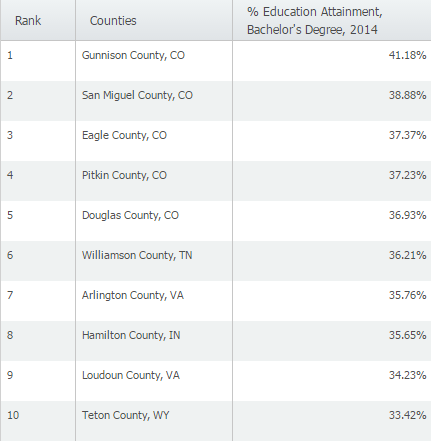
It turns out that the counties with the highest percentages of college graduates are found in lower population counties- Gunnison County, CO for example only has a population of 15,507. In order to analyze this data for larger population counties, we can apply a Data Filter. Here’s how:
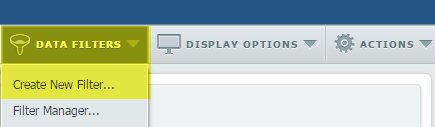
1. From the Data Filters menu near the upper right corner of the window, select Create New Filter.
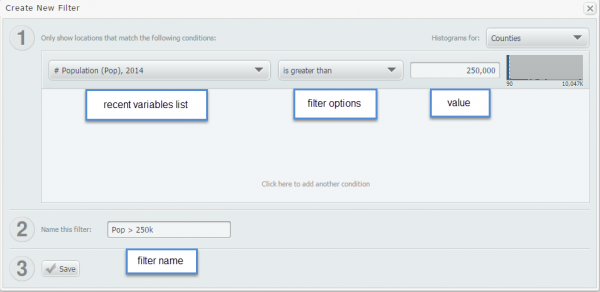
2. The Create New Filter window will pop up. Select a recent variable, filter option, set a value for the filter, and provide a descriptive name.
3. After you select save, you’ll see a list of counties that meet your new criteria.
Below is the new list of counties (> 250,000 population) with the highest % of bachelor’s degrees.
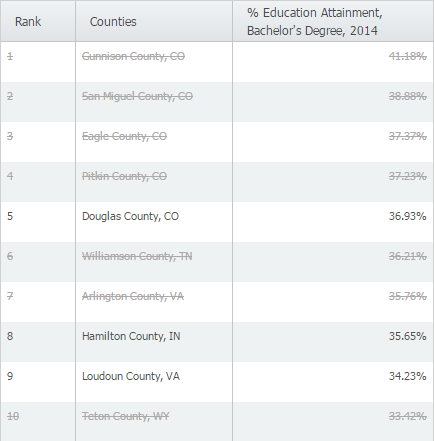
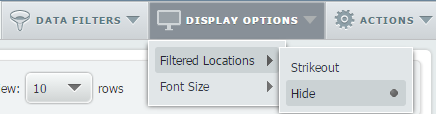
You may see a list of areas listed with a line through the middle to indicate the county has not reached your criteria (shown above). If you’d prefer to not see them at all, the display options menu has an option to hide them altogether.
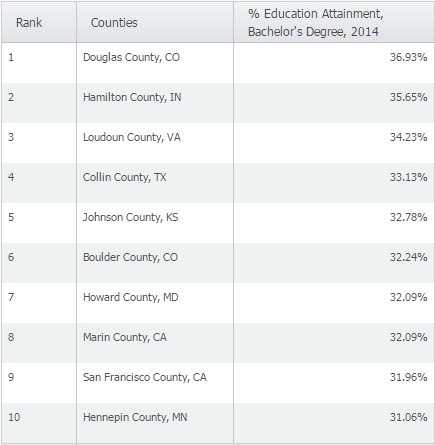
Here is what the results would look like if we hid those counties.
More from SimplyAnalytics


Posted on Aug 15, 2013 by Admin
Anyone who has traveled to Seattle hoping for a sunny day could fairly estimate that it is one of the rainiest states with the highest level of precipitation each year. SimmonsLOCAL varia...
Posted on Jun 08, 2015 by Admin
In this week’s report we take a look at one folder found within SimplyMap’s SimmonsLOCAL data package. SimmonsLOCAL is a powerful targeting and profiling system that provides insights int...
Posted on Feb 27, 2015 by Admin
SimplyMap is an excellent tool for market research, and it’s made even more powerful by Nielsen PRIZM data. Nielsen PRIZM is the highest quality market segment data available. Every house...
Posted on Nov 11, 2015 by Admin
Inspired by a recent help desk ticket, we wanted to discuss how users may utilize SimplyMap to identify relationships between unique variables. For example, does having a college degree s...
Posted on Oct 07, 2013 by Admin
Do you know the quickest way to find the name of a Block Group, Census Tract or ZIP code in our upcoming release for 3.0? The i-Tool gives you the ability to click anywhere on a map to g...
Posted on Jun 21, 2022 by Admin
Hello readers! We hope you’re having a great day. Today we are featuring 5 commonly asked questions about the American Community Survey dataset that’s available to all customers in Simply...
Posted on May 31, 2011 by Admin
Kenneth Johnson of the Science, Industry, and Business Library at the New York Public Library recently provided a "boot camp" on the library's market research resources to budding entrep...
Posted on May 06, 2016 by Admin
Visit us at booth #775 at the ALA 2016 annual conference to meet the SimplyMap team and learn more about the features and functions behind SimplyMap. Have a Ghirardelli Chocolate while we...
Posted on Apr 18, 2008 by Admin
A team of librarians at Drexel University has developed a detailed poster to introduce SimplyMap as a new research tool for the student body. The poster was launched on Drexel Research Da...
Posted on Sep 07, 2011 by Admin
Geographic Research will be exhibiting and presenting during a vendor showcase session at the upcoming North Carolina Library Association (NCLA) Biennial Conference, October 4-7, 2011 in ...