 Go up
Go up


The Location Query Report
Posted on Mar 13, 2023 by Admin
Hello readers! Today, we’re excited to officially introduce the Location Query Report in SimplyAnalytics. The Location Query Report is a powerful feature in SimplyAnalytics that allows users to quickly and easily identify target locations. This report is especially useful for businesses, researchers, and marketers who are looking to find some locations based on their desired conditions. Think of this report as a reimagining of the data filters, where we’ve put that functionality into a report and made it easier to understand what you are viewing. Let’s take a look at an example.
How to Create this Report:In your project, click on New View > “Create” Under the Location Query report
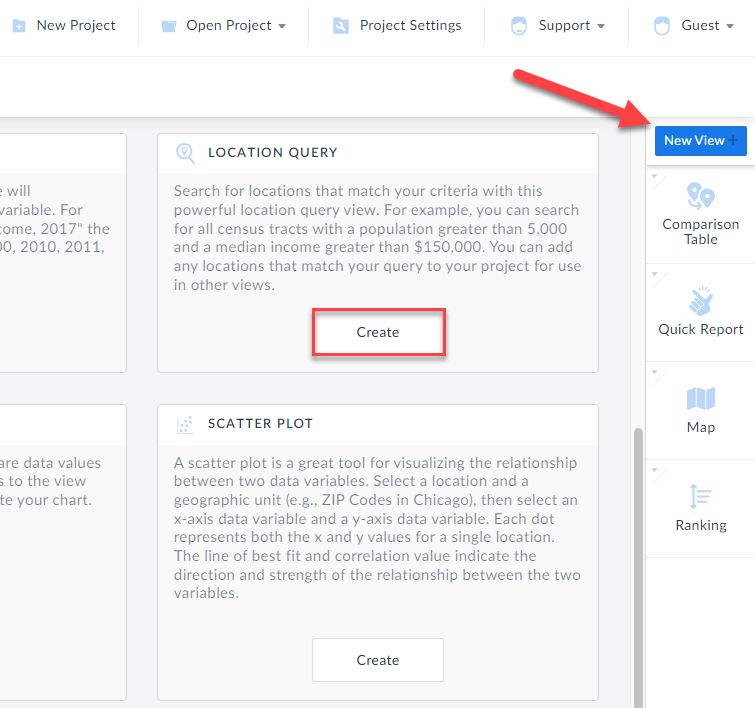
The Location Query report appears. Some tips in the image below of the layout:
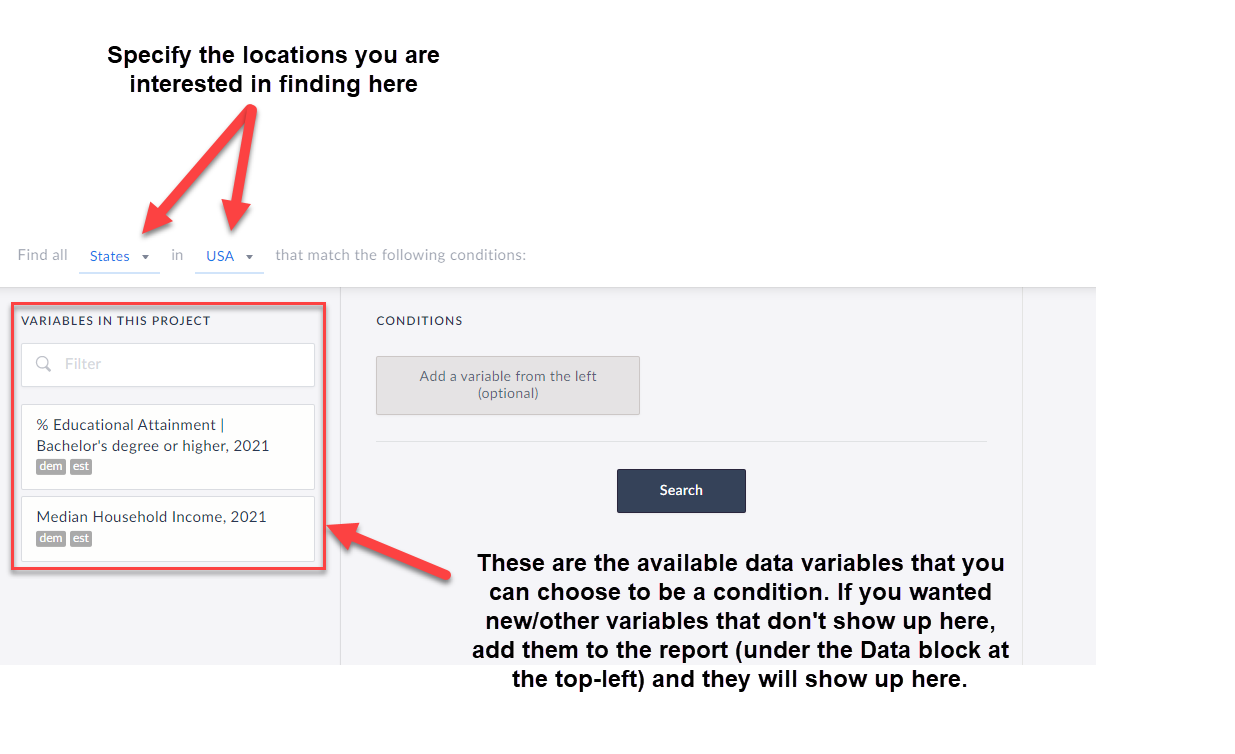
To begin the query, first choose from the dropdown at the top that reads: Find all X in Y that match the following conditions. This is where to choose which locations you are looking for. For example, find all ZIP Codes in Colorado, or all Census Tracts in Miami-Dade County, etc.
Next, add in variables by clicking on them and specify the conditions you are looking for. TIP: Any data variable in SimplyAnalytics can be a condition, and you are welcome to have dozens of conditions, so feel free to be as creative or as specific as you want!
Click Search, and voila! The far-right side of the workspace will display which locations meet your criteria. Check out the report we created below:
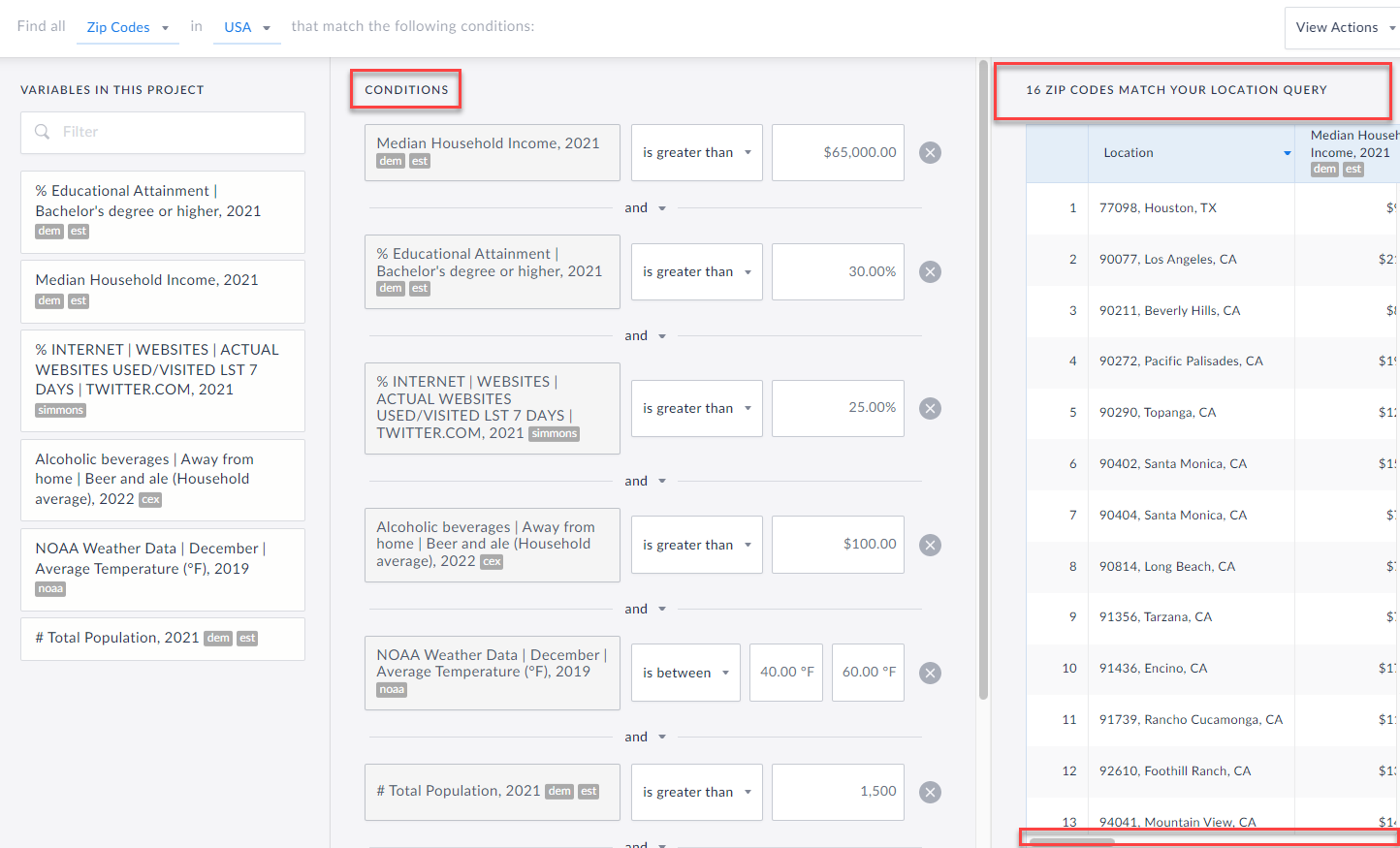 So, in case you were wondering - there are 16 ZIP Codes in the USA that:
Have a Median HH Income greater than $65,000
AND
The % of Adults 25+ with a Bachelor’s degree or higher is greater than 30%
AND
The % of adults who have been on Twitter in the past week is greater than 25%
AND
The Average HH spends more than $100 on Beer and Ale away from Home
AND
The Average Temperature in December is between 40 and 60 degrees
AND
The Zip Codes have a population of more than 1,500
This is sort of a silly example, but it does highlight what you are capable of doing with this report in SimplyAnalytics. Let us know any interesting queries you come up with!
More from SimplyAnalytics


Posted on Nov 11, 2013 by Admin
Chad Boeninger, Business & Economics Subject Specialist at Ohio University Libraries has produced some excellent tutorial videos to help students learn how to analyze data and create ...
Posted on May 06, 2013 by Admin
We will be exhibiting at ALA 2013 at McCormick Place in Chicago, IL, June 28-July 1. The ALA Annual Conference programs, updates, conversations, and other events cover all of the key issu...
Posted on May 25, 2010 by Admin
We will be exhibiting at the 2010 SLA Annual Conference & INFO-EXPO June 13-15 at the Ernest N. Morial Convention Center in New Orleans, LA. Join us at booth 1537 - bring your quest...
Posted on Jul 22, 2015 by Admin
In this week’s SimplyMap report, we take a look at one of our newly available data packages - ConneXions® from Nielsen. The ConneXions® segmentation system integrates consumer behavior an...
Posted on Nov 28, 2023 by Admin
Hello readers! We are happy to announce that SimplyAnalytics has successfully migrated to the Census 2020 boundaries on Sunday, November 19th. This blog will talk about what that is, what...
Posted on Jan 08, 2018 by Admin
The SimplyAnalytics team will be exhibiting at ALA Midwinter in Denver February 9-12. Stop by booth 2152 for a visit and a tour of SimplyAnalytics, the best-in-class analytics and data vi...
Posted on Nov 06, 2013 by Admin
SimplyMap includes a number of helpful support tools; guided wizards available when and where you need them, detailed help files, and an online support center with FAQs and searchable kno...
Posted on Jun 02, 2017 by Admin
We can't wait for ALA Annual this Summer, and the opportunity to share SimplyAnalytics with the ALA community. Stop by the SimplyAnalytics booth (1339) and take a peak at what we've been ...
Posted on Jun 16, 2016 by Admin
This week’s SimplyMap report is a quick tip that we hope you find useful and time saving. Did you know that SimplyMap will save all recently searched business queries for future usage? Le...
Posted on May 08, 2018 by Admin
We will be exhibiting at the SLA conference in Baltimore, MD this June. Stop by booth #912 and say hello - we look forward to demonstrating SimplyAnalytics, answering your questions, and ...