 Go up
Go up


SimplyMap Tip - Editing the Map Legend
Posted on Dec 02, 2014 by Admin
Today we take a look at one of the more advanced features in SimplyMap - editing the map legend. Editing the map legend is a great way to not only customize how the data is distributed on the map, but to also change the look and feel of the map.
First, you can customize the map by changing the geographic unit shown and the variable year from the legend.
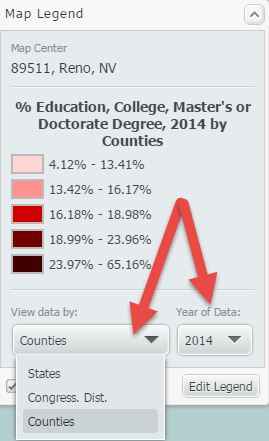
Data can be displayed by State, Congressional District, County, City, ZIP Code, Census Tract, or Census Block Group. The geographic unit can be chosen manually, or you can check the box labeled “Auto-select Geo Unit,” and SimplyMap will automatically display the most appropriate geography based on the zoom level of the map. Zooming into an area will result in increasingly smaller geographic units and present the data in greater detail.
To edit other aspects of the map legend, select “Edit Legend” at the bottom of the legend. The Legend Editor will open. The image below details this dialog, along with an explanation of what can be edited:
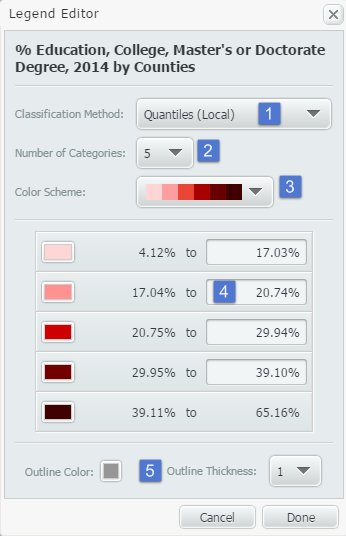
1. Classification Method: This dropdown determines how the data in your map is grouped. There are multiple methods for calculating break values for the data. You can select any of the following from the Classification Method menu:
•Quantiles (Local)
•Quantiles (National)
•Natural Breaks (Local)
•Natural Breaks (National)
•Equal Intervals
Changing from Quantiles (National) to Quantiles (Local) will reconfigure your data ranges to reflect a sample of locations from the current view, as opposed to viewing it on a national scale.
You can learn more about each of the classification methods in the FAQ.
2. Number of Categories: Determines the number of data ranges you would like to see. This will also impact the number of colors you see on the map. By default, this will show 5.
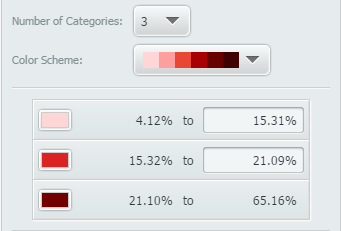
3. Color Scheme: Changes the map’s color scheme. Alternatively, if you select an individual box in the legend, you can apply your color of choice for each.
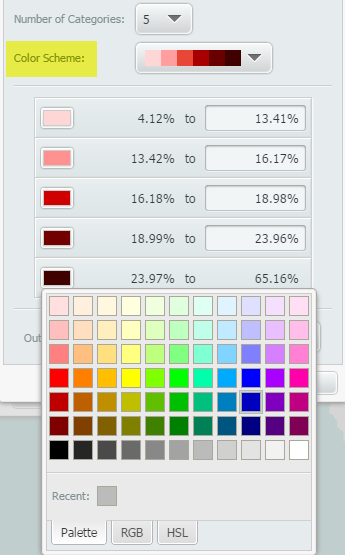
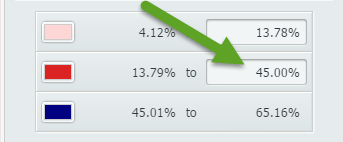
4. Data Values: Allows the user to manually enter new category break values and create custom data ranges.
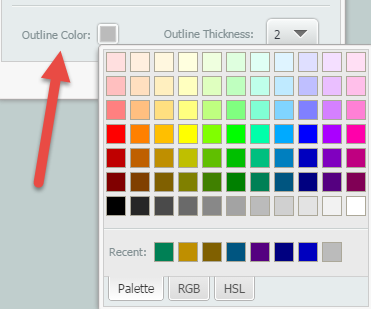
5. Outline Color/Outline Thickness: Changes the color and thickness of your map’s outline. The image below shows a map’s color outline and thickness set to a darker grey, and 2 respectively.
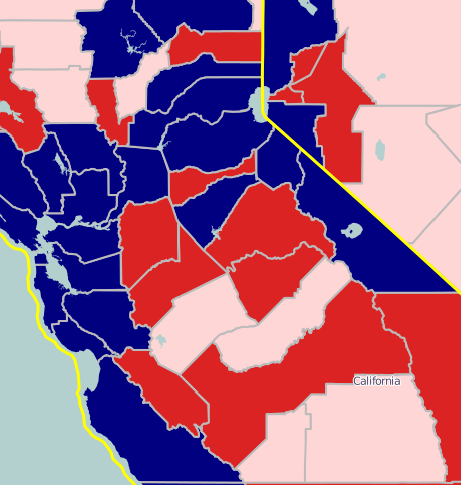
This is what the final map would look like with the edited color outline and thickness:
Stay tuned for more SimplyMap tips and tricks!
More from SimplyAnalytics


Posted on Nov 19, 2019 by Admin
Hello readers! Today we are bringing you a new blog entry inspired by a recent Help Desk question. If you ever have any questions about SimplyAnalytics, please do not hesitate to reach ou...
Posted on Aug 30, 2009 by Admin
Jeff Zaslow, Wall Street Journal columnist and co-author of the The Last Lecture, will speak at the Orlando, FL Public Library on Friday, September 11 at 7 p.m. Zaslow helped the late Ran...
Posted on Mar 04, 2014 by Admin
March 11-15 Indianapolis, Indiana The Public Library Association is prepared for another week of events, workshops and special appearances for librarians and authors. Visit our exh...
Posted on Dec 30, 2009 by Admin
Skokie Public Library, in Skokie, IL has published a useful overview of SimplyMap on the Mike's Space blog on SkokieNet. The article is filled with examples of research questions that can...
Posted on May 10, 2016 by Admin
One benefit of data and applications like SimplyMap is the ability to visualize information. In this week’s report, we’ll take a quick look at some branding preferences in contiguous Amer...
Posted on Sep 07, 2011 by Admin
Geographic Research will be exhibiting and presenting during a vendor showcase session at the upcoming North Carolina Library Association (NCLA) Biennial Conference, October 4-7, 2011 in ...
Posted on Jun 02, 2016 by Admin
Three weeks ago we utilized the SimmonsLOCAL data set to visualize contiguous America’s mayonnaise brand preference. Staying with the American visualization theme, this week’s report will...
Posted on Sep 03, 2015 by Admin
This week we explore the SimmonsLOCAL data package to find which cities in America have the highest percentage of residents enrolled in a frequent flyer program. SimmonsLOCAL is available...
Posted on Dec 11, 2023 by Admin
Hello readers! We have some fantastic news to share. SimplyAnalytics is thrilled to announce the addition of 2020 Election data to our expanding collection of powerful datasets. With this...
Posted on May 25, 2010 by Admin
The American Library Association 2010 Annual Conference is coming and the GRI team is gearing up for another great event this summer. We will be in Washington, D.C. again this year, June ...