 Go up
Go up


Introducing Histograms to SimplyAnalytics
Posted on Sep 14, 2021 by Admin
Welcome readers! Today we are excited to welcome histograms to SimplyAnalytics. We hope you enjoy this wonderful new visualization as much as we do. Let’s take a look.
What is a histogram?
In short, a histogram is similar to a bar chart, but instead groups values into ranges (referred to as “bins”). The height of each bar displays how many values fall within that bin.
Example
Let’s take a look at an easy to read example. The histogram view can be found under New View > Histogram in the program. The example below is showing the % of adults (pop 25+) with a bachelor’s degree or higher in States in the USA.
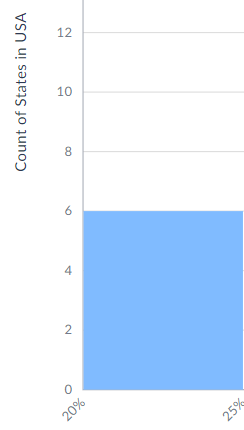
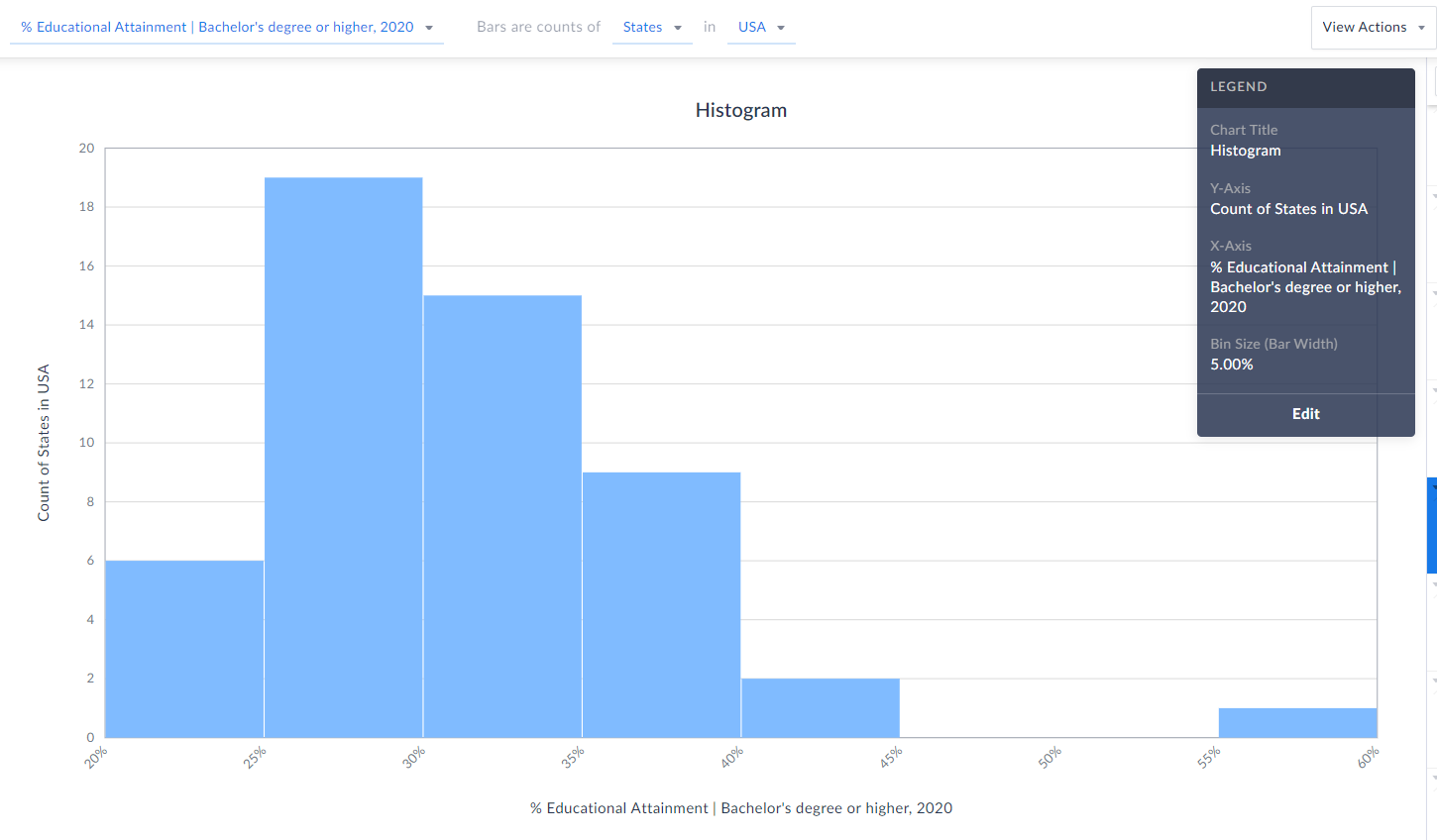 Each bin size, or bar width along the X axis represents a 5% range - so, 20-25%, 25-30%, etc. (zoomed in below)
 The height of each bin represents how many states fall within that bin/range. The example here means that 6 states in the USA have between 20-25% of the adult population who have a bachelor’s degree or higher.
 TIP: Reference the legend on your screen to help interpret the visualization.
Notice towards the far-right of our histogram there does seem to be a potential outlier in the data - there is 1 state where 55-60% of the population 25 and above have at least a bachelor’s degree! Can you guess what state that is?
Answer/Bonus Tip: Towards the top-right of your histogram, click on View Actions > Create Data Table.
TIP: Reference the legend on your screen to help interpret the visualization.
Notice towards the far-right of our histogram there does seem to be a potential outlier in the data - there is 1 state where 55-60% of the population 25 and above have at least a bachelor’s degree! Can you guess what state that is?
Answer/Bonus Tip: Towards the top-right of your histogram, click on View Actions > Create Data Table.
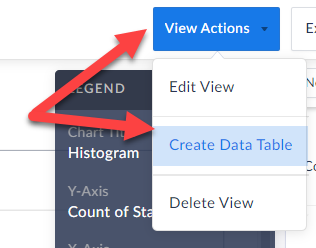 This will generate a Ranking Report for you, and you can quickly sort to find out the answer here…...drum roll…...it’s the District of Columbia, with a value of 57.15% - the lone state within that bin mentioned above.
Last Note: You can edit the color of the bars, title and bin sizes of your histogram by clicking Edit on the Legend.
This will generate a Ranking Report for you, and you can quickly sort to find out the answer here…...drum roll…...it’s the District of Columbia, with a value of 57.15% - the lone state within that bin mentioned above.
Last Note: You can edit the color of the bars, title and bin sizes of your histogram by clicking Edit on the Legend. 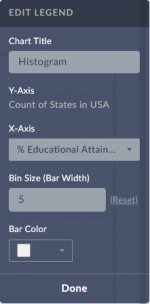 Feel free to make any changes here, and your histogram will automatically be updated.
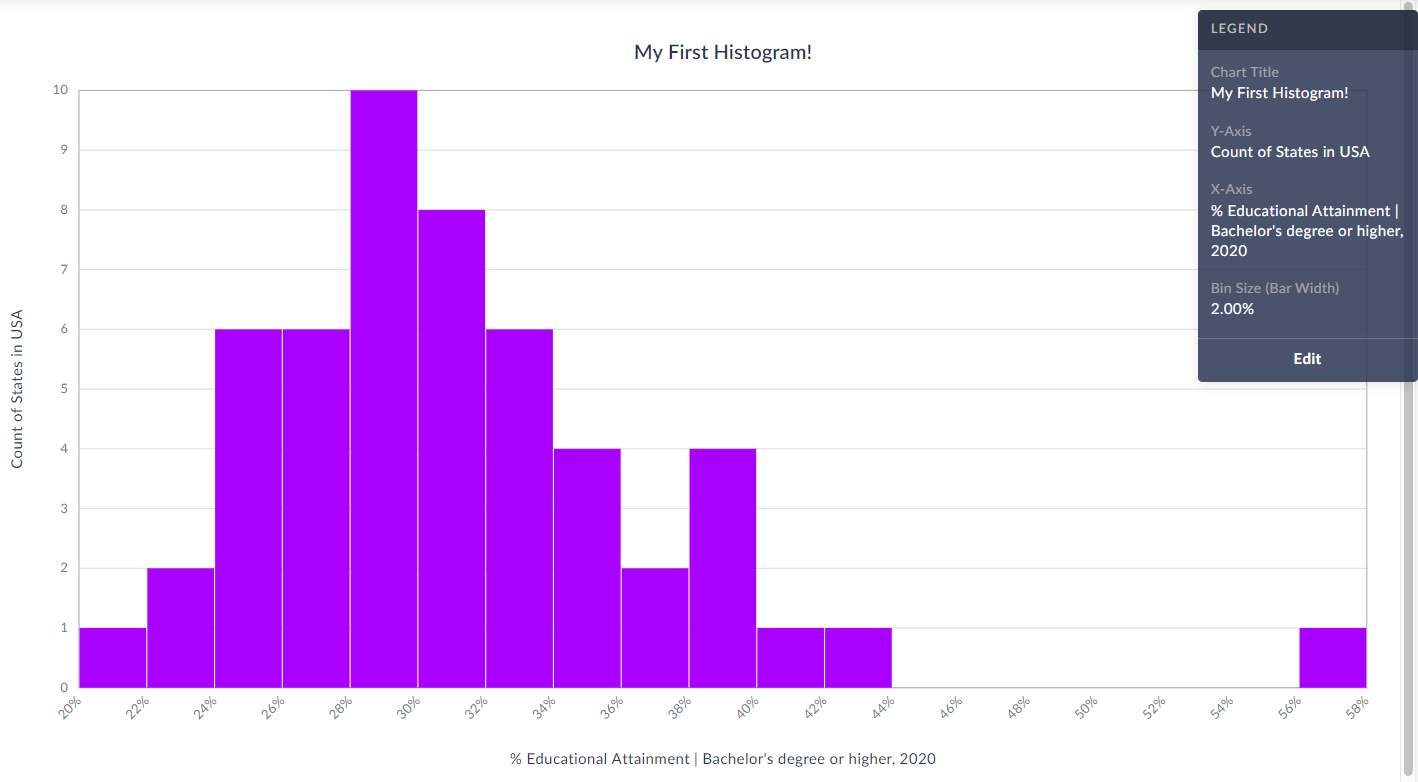
Check out our final histogram below with new colored bins, bin sizes set to 2% instead of 5%, and title.
As always, you are welcome to export your work by clicking on the Export button towards the top-right of the screen.
Feel free to make any changes here, and your histogram will automatically be updated.
Check out our final histogram below with new colored bins, bin sizes set to 2% instead of 5%, and title.
As always, you are welcome to export your work by clicking on the Export button towards the top-right of the screen.
 We hope you enjoy this new visualization! Feel free to contact us at anytime by emailing support@simplyanalytics.com
Each bin size, or bar width along the X axis represents a 5% range - so, 20-25%, 25-30%, etc. (zoomed in below)
 The height of each bin represents how many states fall within that bin/range. The example here means that 6 states in the USA have between 20-25% of the adult population who have a bachelor’s degree or higher.
TIP: Reference the legend on your screen to help interpret the visualization.
Notice towards the far-right of our histogram there does seem to be a potential outlier in the data - there is 1 state where 55-60% of the population 25 and above have at least a bachelor’s degree! Can you guess what state that is?
Answer/Bonus Tip: Towards the top-right of your histogram, click on View Actions > Create Data Table.
This will generate a Ranking Report for you, and you can quickly sort to find out the answer here…...drum roll…...it’s the District of Columbia, with a value of 57.15% - the lone state within that bin mentioned above.
Last Note: You can edit the color of the bars, title and bin sizes of your histogram by clicking Edit on the Legend. Feel free to make any changes here, and your histogram will automatically be updated.
Check out our final histogram below with new colored bins, bin sizes set to 2% instead of 5%, and title.
As always, you are welcome to export your work by clicking on the Export button towards the top-right of the screen.
We hope you enjoy this new visualization! Feel free to contact us at anytime by emailing support@simplyanalytics.com
The height of each bin represents how many states fall within that bin/range. The example here means that 6 states in the USA have between 20-25% of the adult population who have a bachelor’s degree or higher.
TIP: Reference the legend on your screen to help interpret the visualization.
Notice towards the far-right of our histogram there does seem to be a potential outlier in the data - there is 1 state where 55-60% of the population 25 and above have at least a bachelor’s degree! Can you guess what state that is?
Answer/Bonus Tip: Towards the top-right of your histogram, click on View Actions > Create Data Table.
This will generate a Ranking Report for you, and you can quickly sort to find out the answer here…...drum roll…...it’s the District of Columbia, with a value of 57.15% - the lone state within that bin mentioned above.
Last Note: You can edit the color of the bars, title and bin sizes of your histogram by clicking Edit on the Legend. Feel free to make any changes here, and your histogram will automatically be updated.
Check out our final histogram below with new colored bins, bin sizes set to 2% instead of 5%, and title.
As always, you are welcome to export your work by clicking on the Export button towards the top-right of the screen.
We hope you enjoy this new visualization! Feel free to contact us at anytime by emailing support@simplyanalytics.com
More from SimplyAnalytics


Posted on May 26, 2020 by Admin
Hello readers! We hope you are doing well, and thank you for your continued support of SimplyAnalytics. We are excited to announce that scatterplots are officially live! Scatter plots ar...
Posted on Jun 16, 2016 by Admin
This week’s SimplyMap report is a quick tip that we hope you find useful and time saving. Did you know that SimplyMap will save all recently searched business queries for future usage? Le...
Posted on May 08, 2018 by Admin
We will be exhibiting at the SLA conference in Baltimore, MD this June. Stop by booth #912 and say hello - we look forward to demonstrating SimplyAnalytics, answering your questions, and ...
Posted on Mar 04, 2014 by Admin
March 11-15 Indianapolis, Indiana The Public Library Association is prepared for another week of events, workshops and special appearances for librarians and authors. Visit our exh...
Posted on Jul 28, 2013 by Admin
We recently discovered some interesting data on participation and attitudes towards recycling, and decided to dig a bit deeper into our Experian SimmonsLOCAL data. This data package inclu...
Posted on May 03, 2011 by Admin
The GRI team is very excited to announce the launch of SimplyMap 2.0! Completely redesigned, it is now easier than ever to access data and create professional quality thematic maps and re...
Posted on Mar 04, 2020 by Admin
Come meet the SimplyAnalytics team at the 15th annual Electronic Resources and Libraries conference, held at the AT&T Hotel & Conference Center in Austin, TX. We will be exhibitin...
Posted on May 06, 2013 by Admin
The GRI team is looking forward to exhibiting at SLA 2013 at the San Diego Convention Center, June 9th through the 11th. The Special Libraries Association (SLA) is a nonprofit global orga...
Posted on Jun 07, 2011 by Admin
We will be exhibiting at the Special Library Association Annual Conference in Philadelphia and the American Library Association conference in New Orleans later this month. Come and visit ...
Posted on Oct 08, 2019 by Admin
Hello readers! This week’s “From the Help Desk” is short & sweet. Let’s get to it! Question: How do I analyze all of the states at once in a report? Answer: The Ranking Report allows ...