 Go up
Go up


From the Help Desk - Population Data Filter
Posted on May 16, 2022 by Admin
Hello readers! We hope you are having a wonderful day. Today we feature a question from the help desk that we think many users would find useful. Let’s get started.
The question: How can I identify all cities in the US that have a population of 25K to 100K?
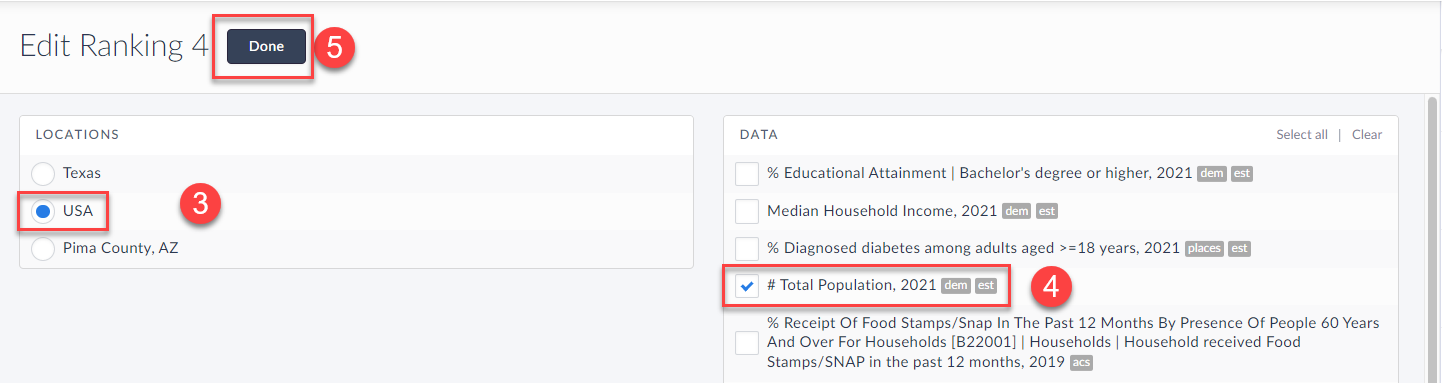
The answer: This is a great question, and a perfect use case for the data filter feature in SimplyAnalytics. Here’s how to do that: In your Project, select New View (1) > Create Ranking Report (2), 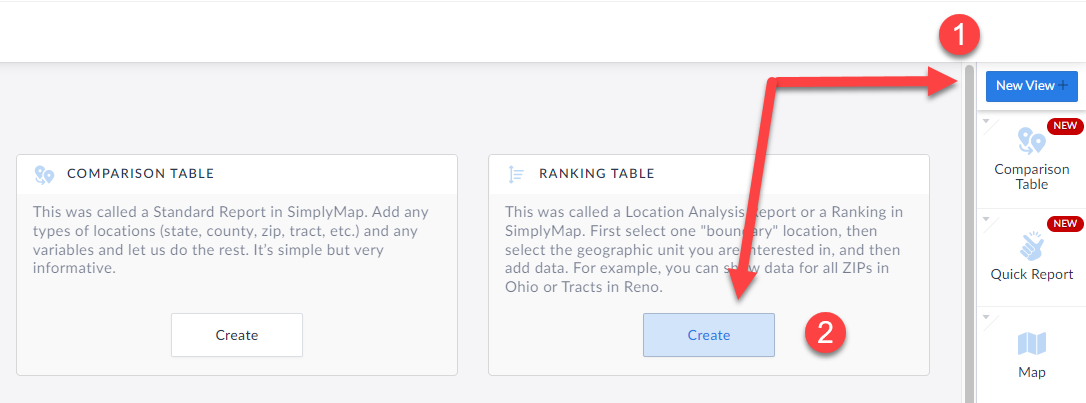 Next, set your Location to: USA (3) - then add in the Total Population data variable (4) that is found under the Popular Data Category. Click Done (5).
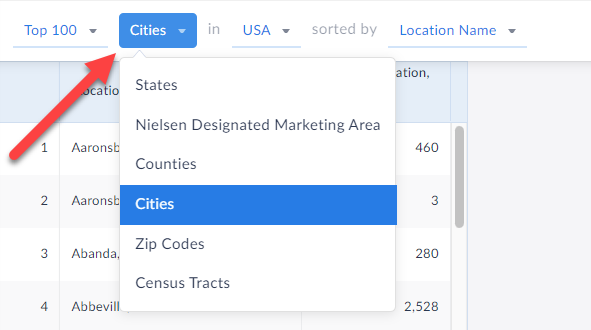
 At the top of the Ranking Report, set the dropdown to be "Cities" such that it is displaying: Cities in USA
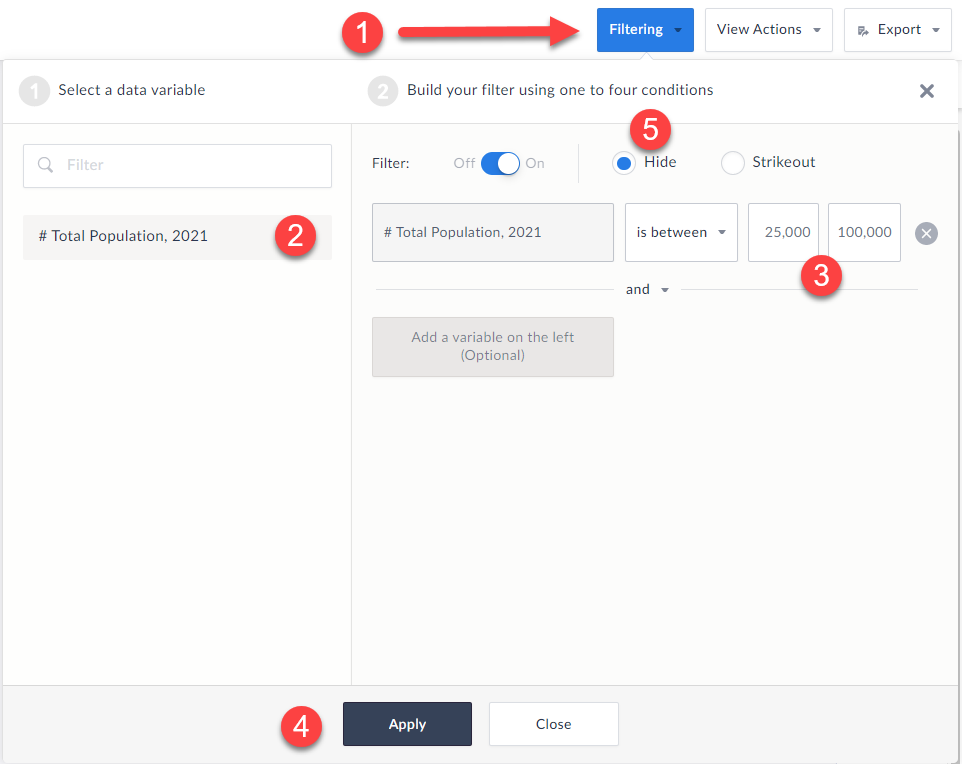
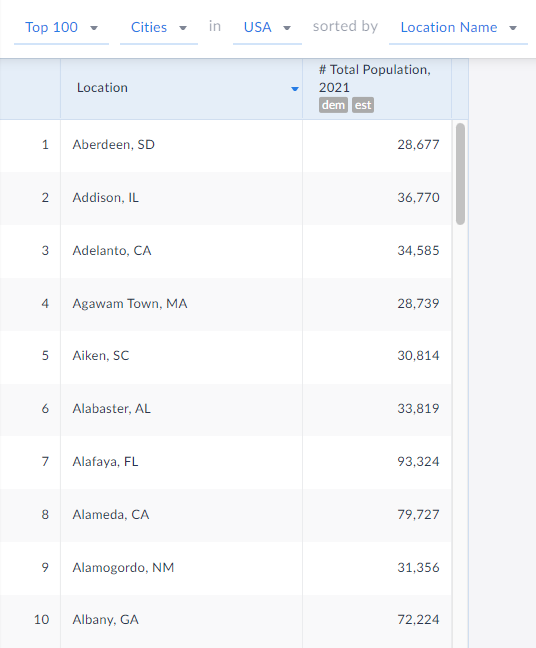
 Click on the Filter option at the top-right of the Ranking Report view (1), and then select "Total Population" (2) as the filter criteria, then "is between" in the second dropdown (3) and enter 25,000 to 100,000, and “Apply” (4). Optional: You may want to check off the option to "hide" as shown in the attached image (5) - this will completely remove any cities outside of the filter criteria.
 And that’s it! When you click on apply and close out the filter panel the final ranking report will be displayed only showing cities between 25 and 100k population.
 We hope you found this write up helpful. Please email us if you have any questions about the filter at: support@simplyanalytics.com
Next, set your Location to: USA (3) - then add in the Total Population data variable (4) that is found under the Popular Data Category. Click Done (5).
At the top of the Ranking Report, set the dropdown to be "Cities" such that it is displaying: Cities in USA
Click on the Filter option at the top-right of the Ranking Report view (1), and then select "Total Population" (2) as the filter criteria, then "is between" in the second dropdown (3) and enter 25,000 to 100,000, and “Apply” (4). Optional: You may want to check off the option to "hide" as shown in the attached image (5) - this will completely remove any cities outside of the filter criteria.
And that’s it! When you click on apply and close out the filter panel the final ranking report will be displayed only showing cities between 25 and 100k population.
We hope you found this write up helpful. Please email us if you have any questions about the filter at: support@simplyanalytics.com
More from SimplyAnalytics


Posted on Sep 07, 2011 by Admin
Geographic Research will be exhibiting and presenting during a vendor showcase session at the upcoming North Carolina Library Association (NCLA) Biennial Conference, October 4-7, 2011 in ...
Posted on Jun 21, 2022 by Admin
Hello readers! We hope you’re having a great day. Today we are featuring 5 commonly asked questions about the American Community Survey dataset that’s available to all customers in Simply...
Posted on Oct 26, 2018 by Admin
Welcome readers! This week we’ll take a look at how to browse for data by category in SimplyAnalytics. Browsing by Category is the default way of browsing for data in SimplyAnalytics. It ...
Posted on Jul 24, 2013 by Admin
Registration is now open for the North Carolina Library Association Conference! Visit us at the 60th biennial conference (Booth #45) through October 15 - 18, 2013. We have beautiful ca...
Posted on Apr 14, 2016 by Admin
This week’s SimplyMap report will provide an overview of one of the more advanced functionalities in SimplyMap - applying multiple filter conditions. Filters can be applied to any map or ...
Posted on Sep 15, 2016 by Admin
While creating a radius location is the fastest and easiest method for creating a custom location, there may be situations that require a more specific and targeted locale. Let’s say for ...
Posted on Sep 08, 2016 by Admin
One of our favorite uses of SimplyMap is to find data that validates our general assumptions and observations. For example, in a previous blog we wrote about the growth of tablet ownershi...
Posted on Feb 25, 2020 by Admin
SimplyAnalytics will be exhibiting at the PLA Conference, held this year at the Music City Center in Nashville, TN on February 26 - 28. Visit the team at Booth 1444 with your questions, f...
Posted on Apr 18, 2008 by Admin
A team of librarians at Drexel University has developed a detailed poster to introduce SimplyMap as a new research tool for the student body. The poster was launched on Drexel Research Da...
Posted on Feb 27, 2009 by Admin
Geographic Research, Inc. is pleased to participate in the Statewide California Electronic Library Consortium's (SCELC) 12th Annual Vendor Day. SCELC members and librarians from other aca...