 Go up
Go up


SimplyMap Tip: Using Multiple Years
Posted on Jul 30, 2015 by Admin
One great feature within SimplyMap is the ability to track the same variable across multiple years. In this report, we will track the percentage of households in the US ordering items from Amazon.com, as we suspect it might show a marked increase over the span of the available years. The value in viewing the same variable over multiple years is that it helps users identify trends in the data over time.
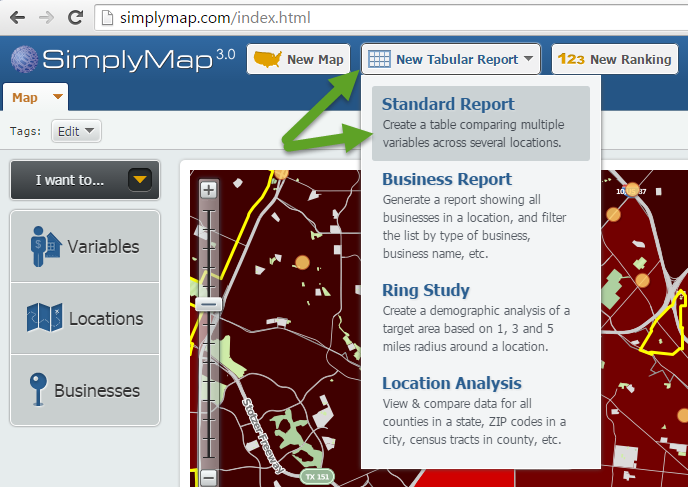
Let’s get started. First, create a Standard Report by selecting New Tabular Report > Standard Report at the top of your screen.
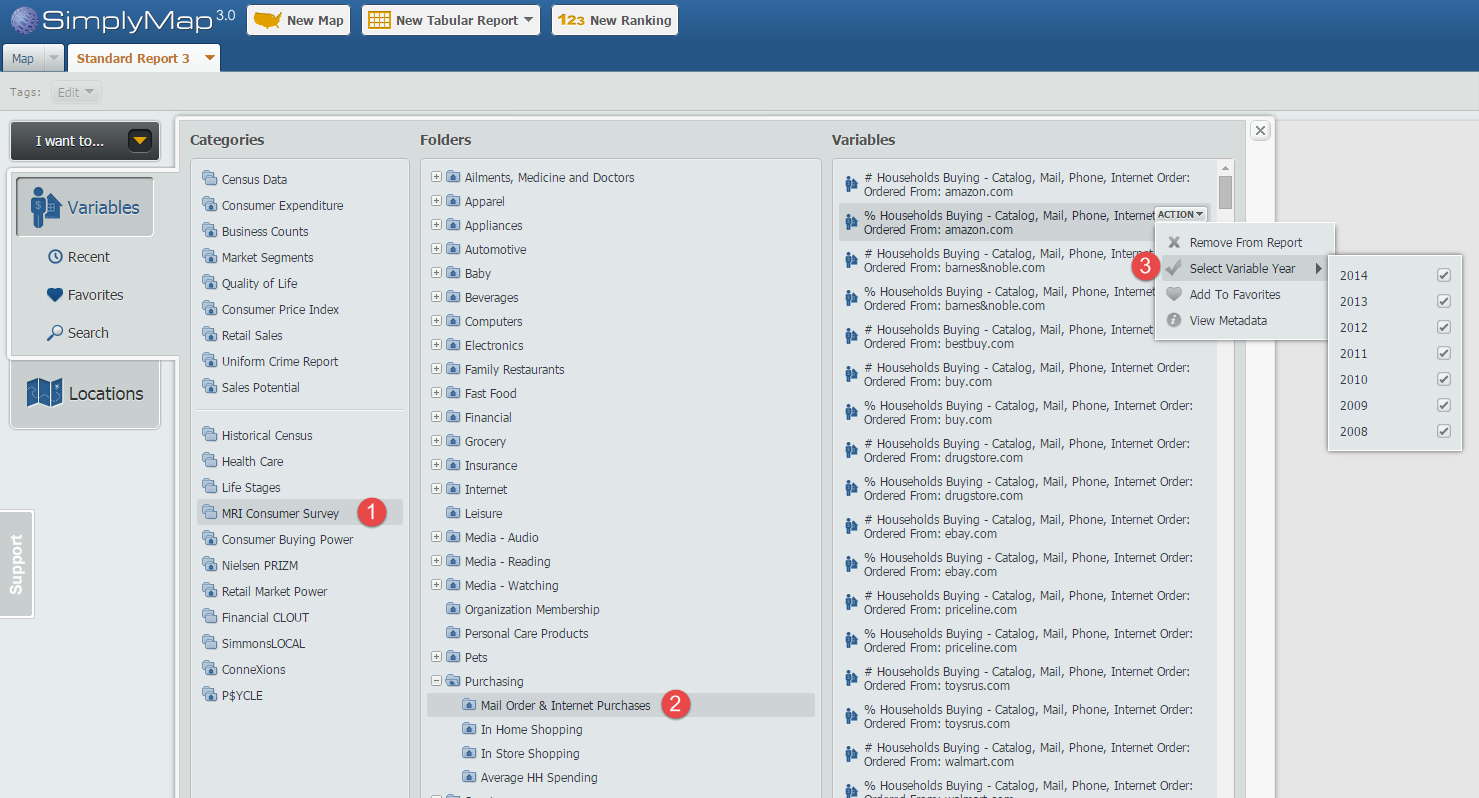
Next, navigate through this path: MRI Consumer Survey » Purchasing » Mail Order & Internet Purchases and hover over the variable, % Households Buying - Catalog, Mail, Phone, Internet Order: Ordered From: amazon.com, 2014 so the actions menu appears. From the “Select Variable Year” option check off the list of years you would like to see. In this example we will use 2008-2014. See the image below for reference:
Close out the variables panel, and your Standard Report will be created using the United States by default. Results below!
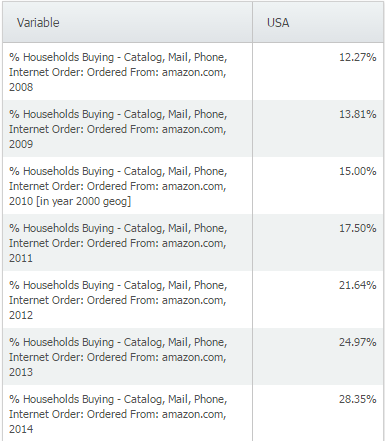
The data clearly shows a trend in Amazon.com ordering throughout years, more than doubling from 2008 to 2014 nationally. We suspected this at the onset, and the data appears to back up our initial thoughts. Feel free to add any additional geographies you’d like to see - the data is available down to the block group level.
There are over 200 variables available within the Mail Order & Internet Purchases folder in the MRI Consumer Survey data, including other websites such as:
ebay.com
buy.com
priceline.com
bestbuy.com
walmart.com
And purchases by catalog/mail order from:
QVC
L.L. Bean
Macy’s
Nordstrom
We encourage you to explore the many variables found within the MRI data package. If your school or library does not currently subscribe to the MRI data set, please write in to support@geographicresearch.com. We are always happy to provide demonstrations and trials of data packages at no cost.
What other trends have you utilized SimplyMap to identify? Let us know in the comments below!
More from SimplyAnalytics


Posted on May 23, 2012 by Admin
We will be exhibiting at the Special Libraries Association (SLA) annual conference and Info-Expo at McCormick Place in Chicago Sunday June 15th - Tuesday July 17th. Visit us at Booth 124 ...
Posted on May 19, 2016 by Admin
Drop by booth #215 at the SLA 2016 conference to chat with us and get the latest info on SimplyMap. We look forward to seeing our customers, friends, and all others interested in learning...
Posted on Mar 09, 2010 by Admin
The GRI team will be exhibiting at the 2010 Public Library Association conference later this month at the Oregon Convention Center in Portland, OR. The PLA National Conference is the prem...
Posted on Oct 16, 2015 by Admin
Did you know that SimplyMap includes the ability to export Shapefile data for use in desktop mapping software (such as MapInfo or ArcGIS)? This advanced feature extends the power of Simpl...
Posted on Oct 30, 2018 by Admin
We are pleased to be exhibiting at this year's 30th Annual Charleston Library Conference! The Charleston Vendor Showcase will be held Tuesday, November 6, 2018, from 10:30 a.m. to 6:00 p....
Posted on Oct 02, 2015 by Admin
In this week’s SimplyMap tip, we wanted to do a quick write up reminding users about the Saved Tabs feature within SimplyMap. Did you know that SimplyMap will automatically save all of yo...
Posted on Dec 09, 2014 by Admin
In this week’s SimplyMap blog post, we set out to discover which large US cities spend the most money per year on their pets. To find this out we used the variable, “Pets, Household Avera...
Posted on Dec 07, 2011 by Admin
We will be exhibiting at the American Library Association Midwinter Meeting & Exhibition in Dallas this January. Visit us at booth 2513 for a demonstration and to have all your Simply...
Posted on Feb 24, 2019 by Admin
We will be exhibiting at SCELC* Vendor Day on March 14th. Visit us at table 510 and attend one of our two sessions demonstrating SimplyAnalytics. The presentations will highlight newly av...