 Go up
Go up


Introducing Simmons NCS Crosstabs
Posted on Jul 20, 2020 by Admin
Hello readers! We hope you are doing well and staying safe. Today we are excited to introduce the Simmons NCS crosstabs functionality! This is a feature we’ve been working on for a while, and we know many of you out there have requested it. The wait is officially over, and this data/feature is now available for trial or purchase right now. Let’s dig into it.
What is a crosstab?
A crosstab is a table showing the relationship between two or more data variables. This is extremely useful in identifying correlations, patterns or trends when working with large datasets.
What exactly does that mean?
This means you can instantly look up to see if there is any relationship between age groups and social media patterns. Or trends between income and the types of sports people watch on TV, or the types of vehicles owned relative to exercise habits. Because we use the Simmons NCS data, there are literally tens of thousands of demographic and consumer behavior variables you can research!
Why should I be excited?
Traditionally, doing this type of analysis is tedious and requires users to be well versed in advanced data analytics platforms that require a lot of time and effort to learn. In SimplyAnalytics, however, we’ve developed this feature to enable all users to run crosstabs in a few mouse clicks!
Show me!
In SimplyAnalytics, click on New View > Create under the crosstabs report. This opens the Edit View screen. By default, the USA will be selected as the location since Simmons NCS data is only available at the national level.
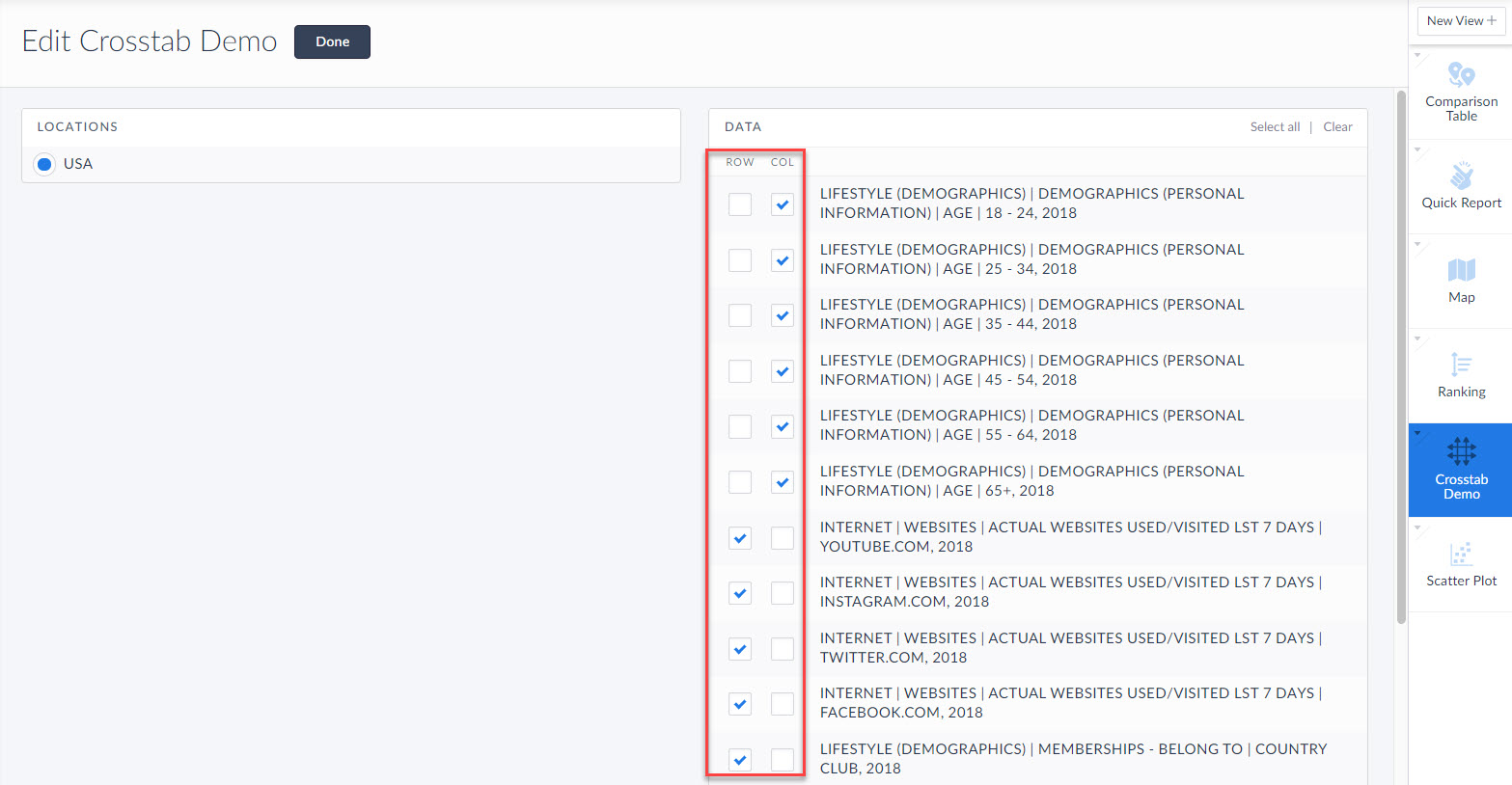
From here, add some data variables you want to analyze. SimplyAnalytics will automatically add demographic variables as columns to easier make sense of the data. Click done, and voila you’re done! The crosstab generates.
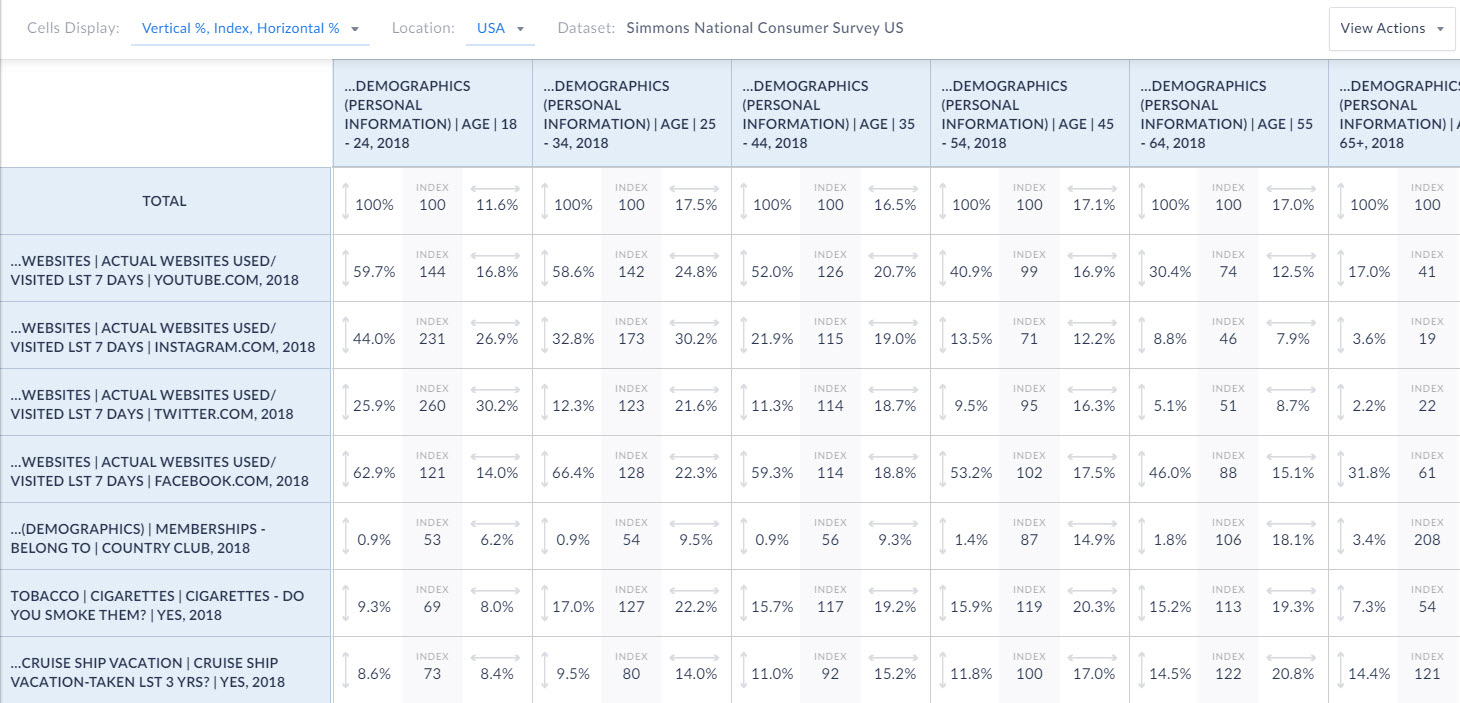
Interpreting the 3 values in the boxes
Each of the boxes in the crosstab report has 3 different values. Let’s discuss those now.
Index - Displays the likelihood versus the total population, of meeting both the Column and Row specifications. The base level is 100. So anything over 100 is more likely and any value less than 100 is less likely. You can read these as percentages as well. This is a great way to quickly scan the data. For example, looking at our data, the index value for using Twitter is off the charts for the 18-24 age group at 260! Compare this with the 65+ age group which is only an index of 22.
Vertical Percent - Looks like this:  The percentage of people who have a given characteristic as defined by the Column heading.
Horizontal Percent - Looks like this:  The percentage of people who have a given characteristic as defined by the Row heading.
Let’s take a look at how to interpret the percentages below.
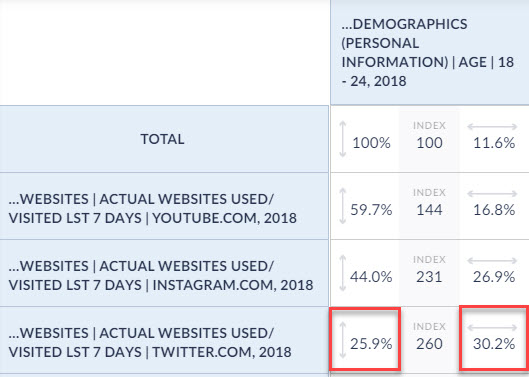
The vertical percent is 25.9%. This means that of people aged 18-24, 25.9% have used Twitter in the past 7 days.
The horizontal percent is 30.2%. This means that 30.2% of users who have visited Twitter in the past 7 days are aged 18-24.
If you’d like to take a look at additional metadata, you can select the dropdown at the top of the report to instead display: Sample, Weighted, and Total %.
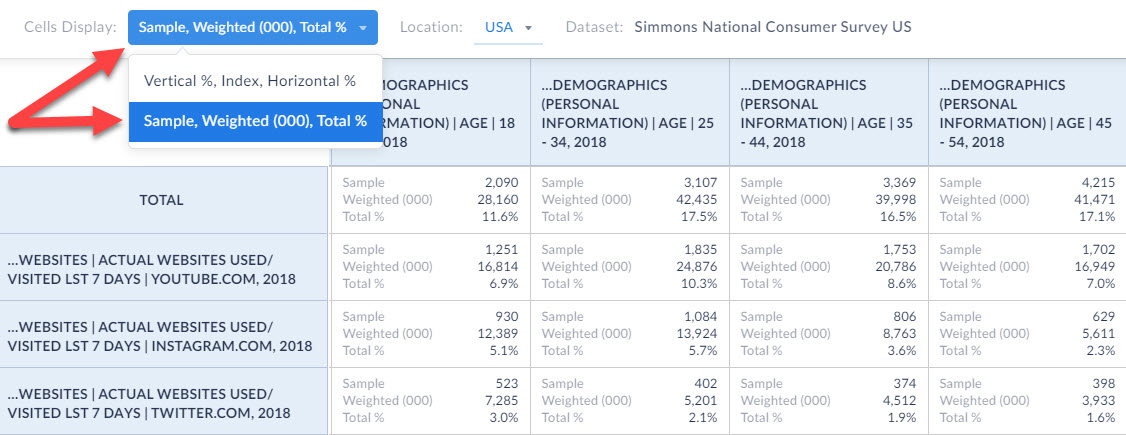
Let’s define those values, and then look at an example again.
Sample - the actual number of respondents to the Simmons NCS survey who meet the specifications of both the Row and the Column.
Weighted - a projection the total number of adults in the U.S. population who meet the specifications of both the Row and the Column. Add three zeros (000) to the end of the number to get the total value.
Total % - The crosstab count divided by the total population in the USA.
Let’s take a look at how to interpret this below:
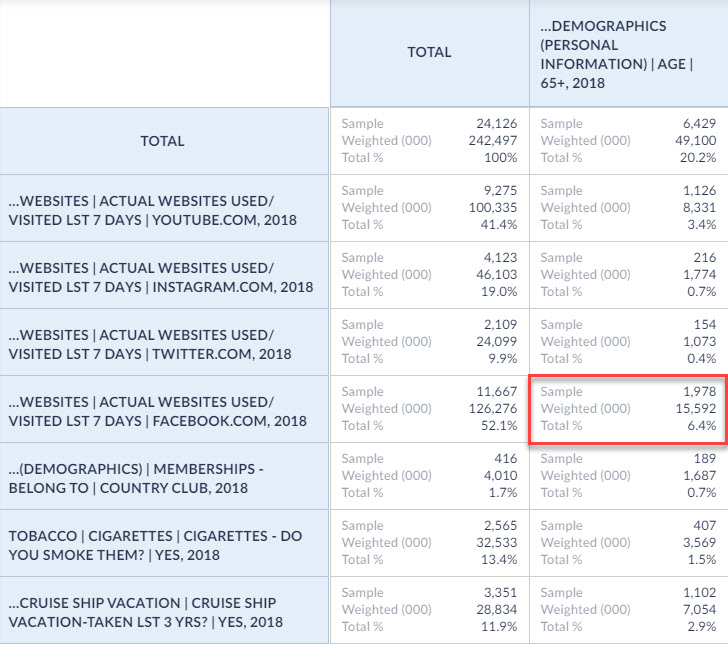
Sample - The number of respondents to the Simmons NCS Survey aged 65+ who have used Facebook in the past 7 days
Weighted - 15,592,000 is the estimated number of adults in the USA aged 65+ who have used Facebook in the past 7 days
Total % - Adults aged 65+ who have used Facebook in the past 7 days are 6.4% of the total population of the US
You will also notice that there is a Total column that cannot be removed. This is really helpful in understanding the total values across the entire survey.
And, that’s all there is to it! Thank you for reading this in depth overview of the crosstab functionality in SimplyAnalytics. We can’t wait to see what interesting crosstabs you come up with! Feel free to email us at any time with your questions or issues at: support@simplyanalytics.com
More from SimplyAnalytics


Posted on Dec 09, 2014 by Admin
In this week’s SimplyMap blog post, we set out to discover which large US cities spend the most money per year on their pets. To find this out we used the variable, “Pets, Household Avera...
Posted on Feb 26, 2014 by Admin
The Statewide California Electronic Library Consortium is holding another packed week of workshops and networking during the SCELCapalooza event in March 2014. Geographic Research will b...
Posted on Nov 24, 2014 by Admin
In this week’s report, we research America’s most educated cities. SimplyMap contains a total of 111 educational attainment variables, including general population and by race. We used th...
Posted on Jan 27, 2015 by Admin
In this week’s report exploring SimplyMap data, we take a look at where America’s bookworms reside. To find this data, we used the variable, Reading (Household Average), 2014 found in the...
Posted on May 06, 2013 by Admin
The GRI team is looking forward to exhibiting at SLA 2013 at the San Diego Convention Center, June 9th through the 11th. The Special Libraries Association (SLA) is a nonprofit global orga...
Posted on Feb 16, 2009 by Admin
Men's Health conducted their first survey of America's recycling habits, and used SimplyMap in their research. Here’s how the editors explain their methodology: To determine how well citi...
Posted on Jan 17, 2011 by Admin
Come visit the Geographic Research booth at the Ontario Library Association Super Conference this season. The conference will take place on February 2-5, 2011 at the Metro Toronto Convent...
Posted on Mar 02, 2015 by Admin
In this week’s SimplyMap tip, we outline the process of creating a radius location. Radius locations are a great way to quickly gather information from an area surrounding a target addres...
Posted on Jan 12, 2020 by Admin
Happy New Year! SimplyAnalytics will be exhibiting at the ALA Midwinter meeting, held this year at the Pennsylvania Convention Center in Philadelphia on January 24th-27th. If you attend, ...
Posted on Sep 21, 2009 by Admin
The North Carolina Library Association will hold its annual conference in Greenville, NC at the Greenville Convention Center from October 6-8, 2009. Geographic Research, Inc. will be exhi...