 Go up
Go up


How to Use the SIC Search Feature
Posted on Oct 29, 2015 by Admin
Did you know that SimplyMap allows you to search for businesses by NAICS or SIC codes? Searching by these codes is a great alternative to the general keyword search. Using the keyword search function to search for a business is the quickest method of compiling a business report or placing businesses onto a map. But searching by keyword may result in a broad mix of different business types. Narrow your search to a specific business classification type to generate more meaningful results.
Let’s take a look at an example of searching for coffee shops by SIC code in Austin, Texas.
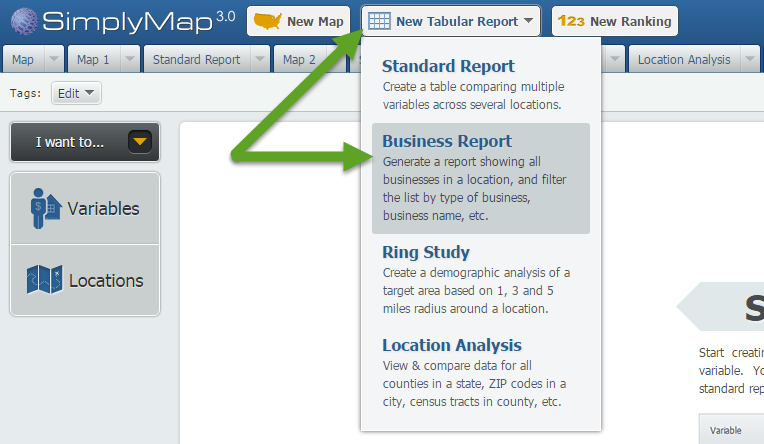
First, Click on New Tabular > Business Report to start a new report.
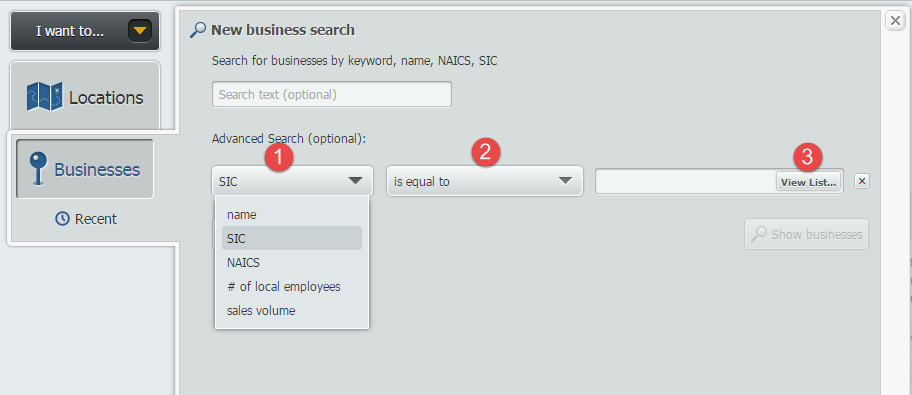
Open the locations panel, and search by City > Austin. Next, open the Businesses panel to bring up the New business search. Click on the Add Condition button to bring up your options.
1. Set the First dropdown to SIC
2. Second the second dropdown to “is equal to”
3. Click on View List to search by SIC codes.
The SIC Selector screen will open up. From here you may browse by industries or click on the Search tab (1) and type “coffee” (2). When you find the SIC code you are looking for, hover over the option and select Use This Code (3).
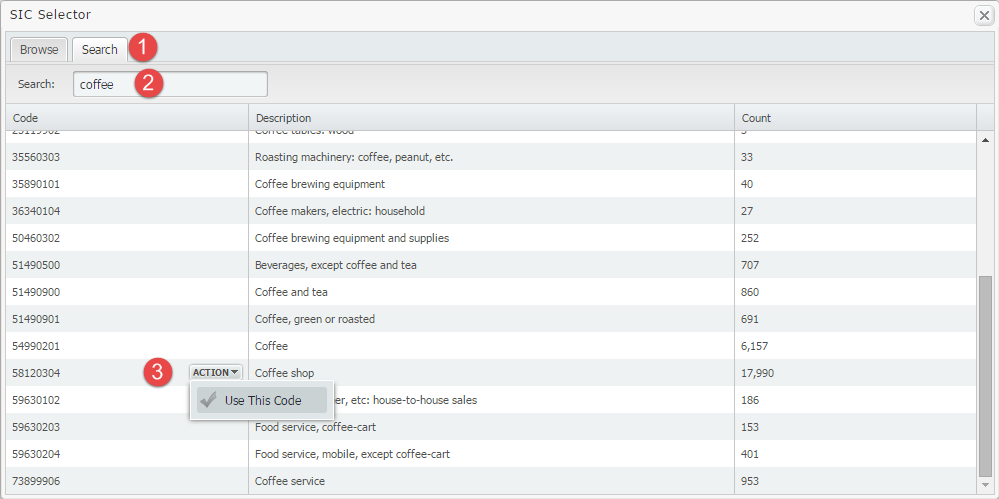
The “Count” column lists the number of data points for that SIC code, across the entire country.
It looks like there are a total of 22 coffee related SIC codes available. If the keyword “coffee” were used, your results would have searched through all codes (coffee roasters, coffee equipment stores, etc.).
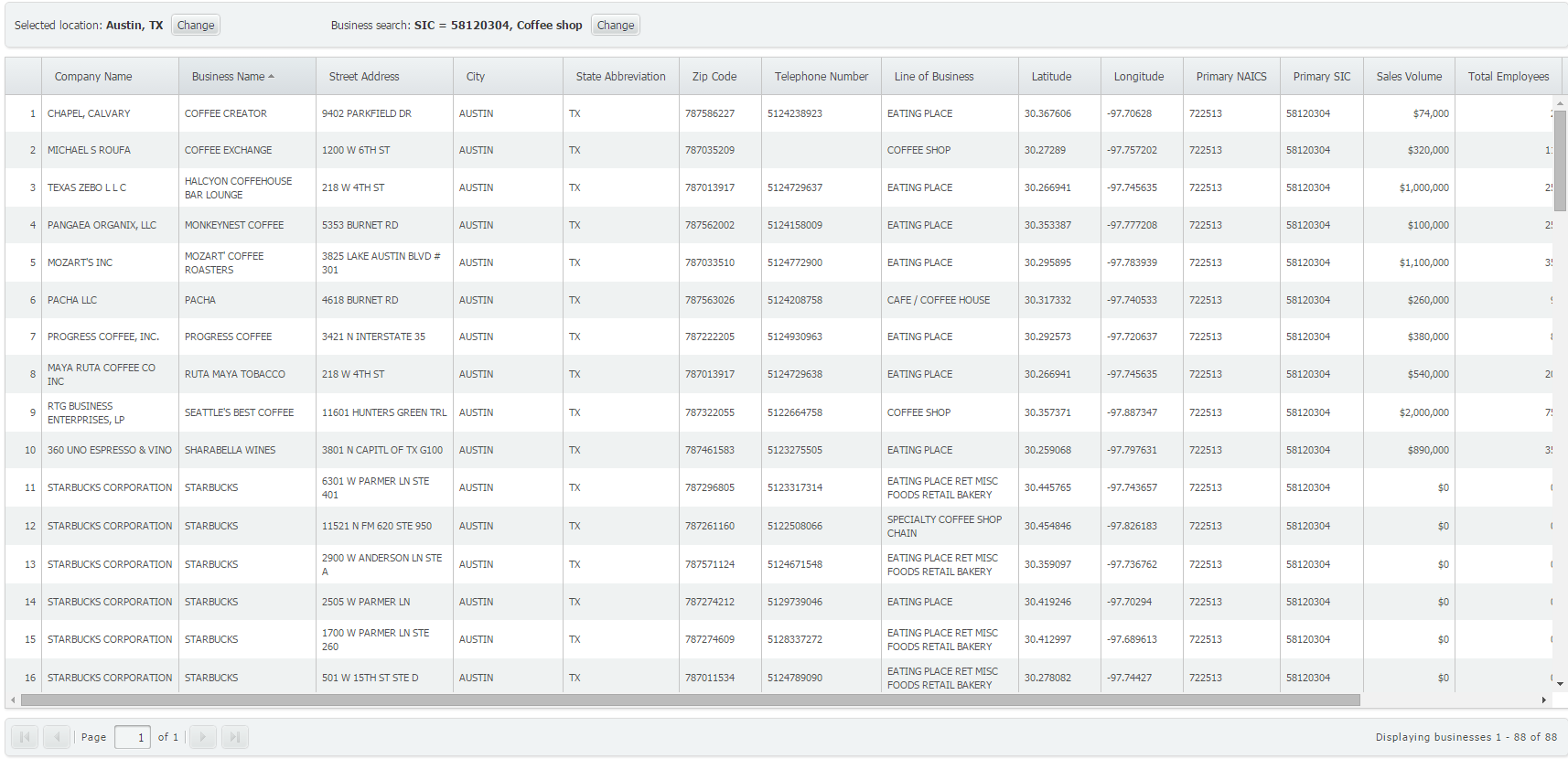
That’s all these is to it! Click on Show Businesses to generate your report. It looks like there are more than 80 classified coffee shops in Austin!
We hope you found this week’s report useful. Tune in for more SimplyMap reports and tips!
More from SimplyAnalytics


Posted on Jan 07, 2015 by Admin
In this week’s exploration of SimplyMap data, we set out to find which cities in the United States have the highest percentage of older houses. To determine this, we used the variable “% ...
Posted on Feb 25, 2020 by Admin
SimplyAnalytics will be exhibiting at the PLA Conference, held this year at the Music City Center in Nashville, TN on February 26 - 28. Visit the team at Booth 1444 with your questions, f...
Posted on Sep 05, 2019 by Admin
SimplyAnalytics will be exhibiting at the biennial North Carolina Library Association conference, to be held this year at the Winston-Salem Benton Convention Center. If you are attending,...
Posted on Oct 29, 2015 by Admin
Did you know that SimplyMap allows you to search for businesses by NAICS or SIC codes? Searching by these codes is a great alternative to the general keyword search. Using the keyword sea...
Posted on Jun 02, 2017 by Admin
We will be exhibiting at SLA in Phoenix, AZ on June 18th-20th. You can find the SimplyAnalytics team at Booth #905. Stop by and check out our groundbreaking new interface, have a chocolat...
Posted on Mar 09, 2010 by Admin
The GRI team will be exhibiting at the 2010 Public Library Association conference later this month at the Oregon Convention Center in Portland, OR. The PLA National Conference is the prem...
Posted on Oct 26, 2018 by Admin
Welcome readers! This week we’ll take a look at how to browse for data by category in SimplyAnalytics. Browsing by Category is the default way of browsing for data in SimplyAnalytics. It ...
Posted on Sep 27, 2019 by Admin
Hello readers! This week we provide an in-depth response to a question asking about the legend classification methods in SimplyAnalytics. This response is now part of our Help Center: htt...
Posted on May 28, 2009 by Admin
The Charleston Advisor, which publishes critical reviews of online resources for libraries, published a review of SimplyMap in April. We are very pleased to have received 4 1/4 stars out...
Posted on Nov 19, 2019 by Admin
Hello readers! Today we are bringing you a new blog entry inspired by a recent Help Desk question. If you ever have any questions about SimplyAnalytics, please do not hesitate to reach ou...