 Go up
Go up


SimplyMap Tip: Using the Variable Search
Posted on Sep 18, 2015 by Admin
With tens of thousands of variables available in SimplyMap, it’s common for users to wonder whether or not a particular variable they have in mind is available in SimplyMap. This is where the value of our variable search function comes in. The variable search allows you to type in a keyword or two, and will output any related results. Let’s take a look at an example.
We’ll start with something broad and go with a simple search for data related to income.
Open the Variables Panel and click on the Search icon. Enter your keyword, “income,” in the empty text box and hit the search button. Your results will be displayed (over 2,800 income related variables!).
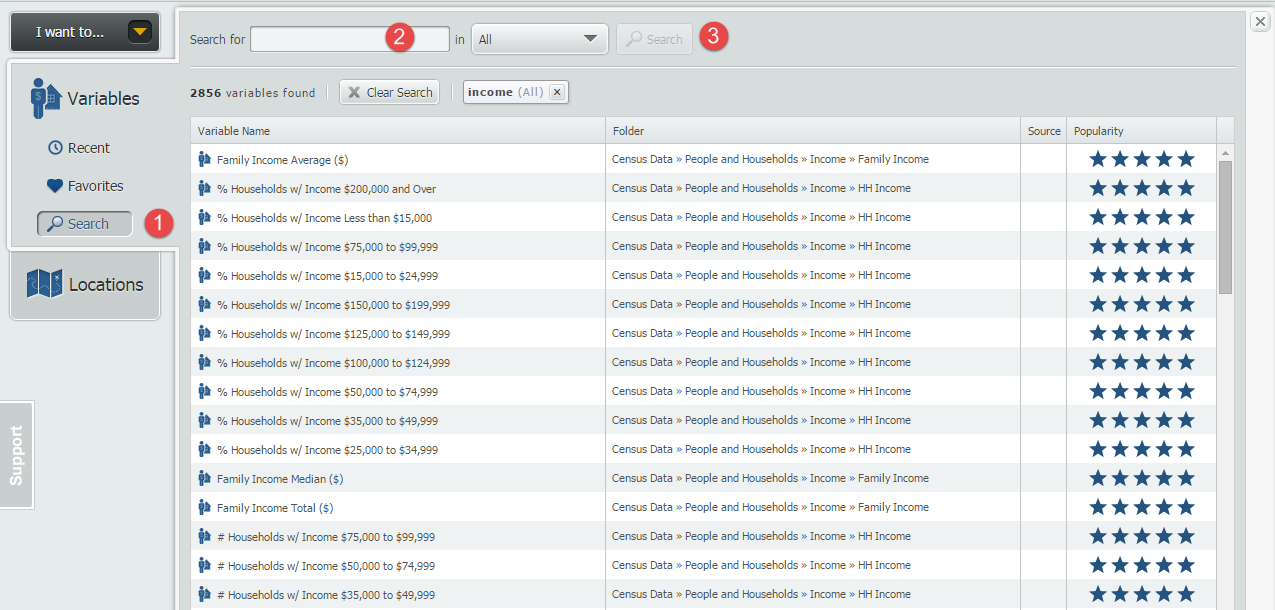
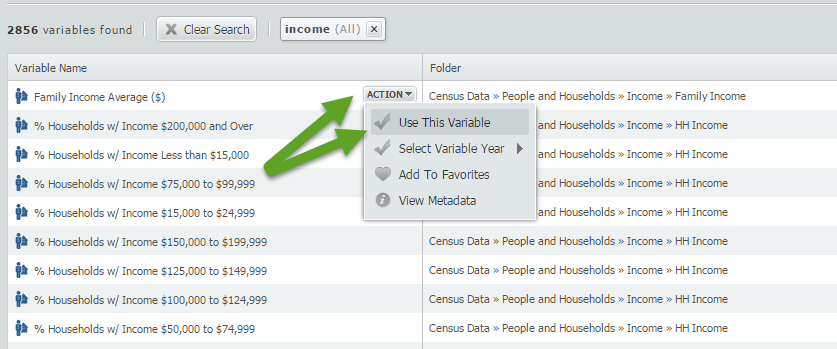
By default, SimplyMap will display results ordered by the popularity of that given related variable among all SimplyMap users. In this example, popular income variables include: Family Income Average, Family Income Median, and HH Income ranges. Hover over a variable and select Use This Variable to add into your report or map.
Using the basic keyword search is a quick way to determine the availability of a variable. Equally helpful is the ability to combine an additional keyword into your search.
To narrow down the 2856 “income” results displayed, return to the search box and add an additional query. In this example, we will look for all variables related to “income” and “Hispanic”.
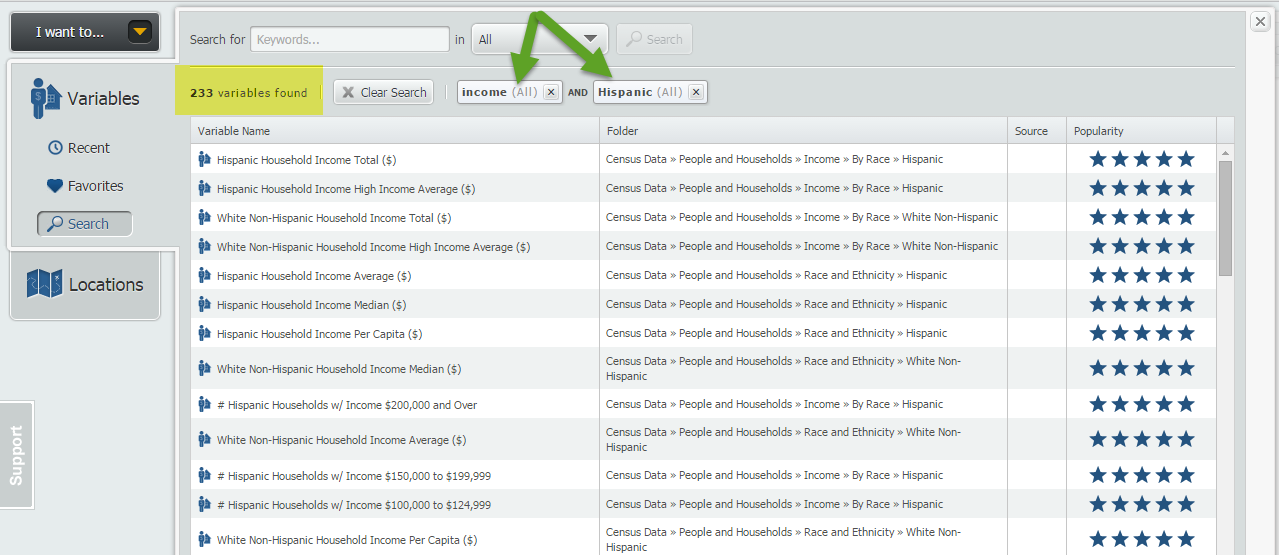
Your results will now be refined to display variables related to “income” and “Hispanic”, (233 in total), including Hispanic Household Income Average.
Final TIP:
There is a dropdown option located directly to the right of the keyword search function. This dropdown will allow you to specifically search by: Variable Name, Source Agency, Folder or All of the Above.
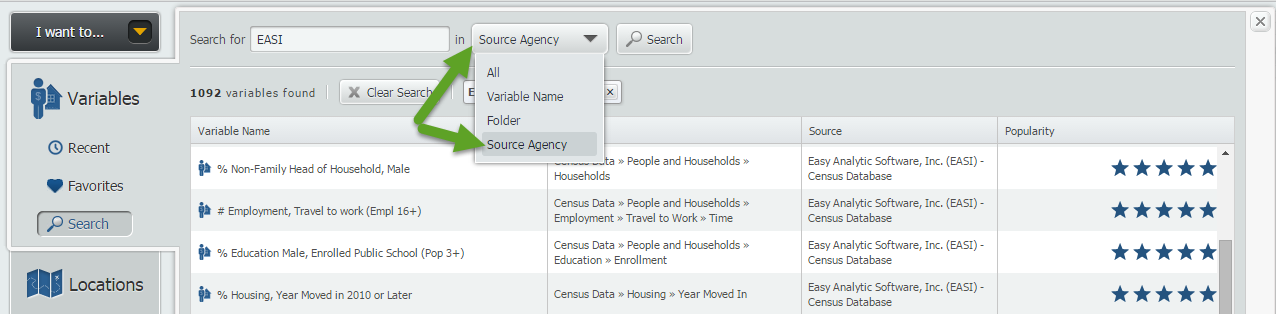
NOTE: If you do not select the dropdown box above, the keyword search will include all of the search options.
That’s it for this week’s tip, we hope that we’ve inspired some users to go out and try the variable search function.
Stay tuned for more tips and SimplyMap reports!
More from SimplyAnalytics


Posted on Nov 03, 2017 by Admin
This week we’ll talk about one of our favorite features in SimplyAnalytics - the custom combination location. This feature is a simple and effective means to create custom geographies whe...
Posted on Oct 07, 2013 by Admin
Do you know the quickest way to find the name of a Block Group, Census Tract or ZIP code in our upcoming release for 3.0? The i-Tool gives you the ability to click anywhere on a map to g...
Posted on Jun 27, 2009 by Admin
The library faculty at Regent University in Virginia recently spotlighted SimplyMap in their Library Faculty Recommendations blog, highlighting its powerful ability to create professional...
Posted on Aug 26, 2015 by Admin
Most people in the United States could probably guess which cities are popular amongst tourists - Los Angeles and New York. But can you guess how much money is spent in novelty and souven...
Posted on Nov 22, 2016 by Admin
We will be exhibiting at ALA Midwinter in Atlanta, Georgia in January. You can find the GRI team at Booth 1155, where we will be catching up with customers old and new, and sharing some e...
Posted on Aug 30, 2009 by Admin
Jeff Zaslow, Wall Street Journal columnist and co-author of the The Last Lecture, will speak at the Orlando, FL Public Library on Friday, September 11 at 7 p.m. Zaslow helped the late Ran...
Posted on Oct 08, 2019 by Admin
Hello readers! This week’s “From the Help Desk” is short & sweet. Let’s get to it! Question: How do I analyze all of the states at once in a report? Answer: The Ranking Report allows ...
Posted on Jan 10, 2024 by Admin
We are delighted to announce our sponsorship of the Midwest Entrepreneurship Case Competition! At SimplyAnalytics, we understand the power of data-driven decision-making in entrepreneursh...
Posted on Dec 15, 2014 by Admin
Stop by the Geographic Research booth at the Ontario Library Association Super Conference to check out SimplyMap Canada. The conference will take place January 28-31 at the Metro Toronto ...
Posted on Jun 25, 2015 by Admin
In this week’s SimplyMap report, we review the different options available when searching for a business. The easiest and fastest method of mapping businesses or creating a business repor...