 Go up
Go up


Exploring SimplyMap Data: ConneXions® from Nielsen
Posted on Jul 22, 2015 by Admin
In this week’s SimplyMap report, we take a look at one of our newly available data packages - ConneXions® from Nielsen. The ConneXions® segmentation system integrates consumer behavior and usage measures for technology, voice, video and data services with demographics and lifestyle characteristics. ConneXions® enables communications service providers, consumer durables manufacturers, and other companies focused on technology adoption a way to cost-effectively and efficiently retain existing customers, while continuing to acquire new ones.
To give you an idea of these segments, we’ll rank some cities from the US and view each of the top segment’s metadata. Let’s get started!
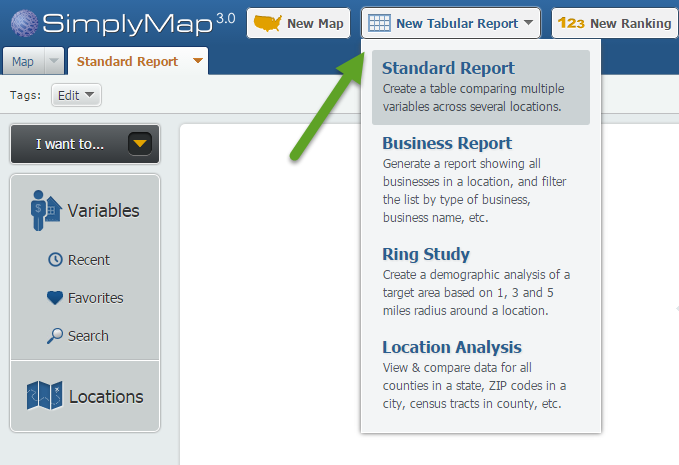
Step 1: Create a Standard Report by selecting New Tabular Report > Standard Report.
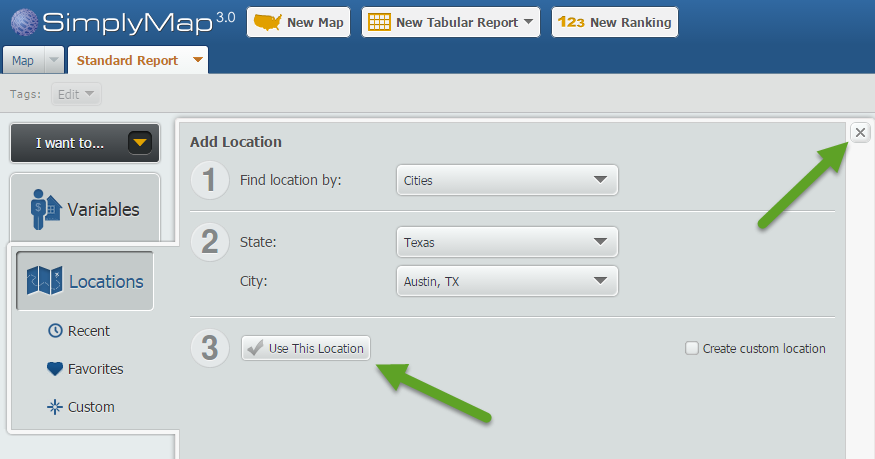
Step 2: Choose a location from the Locations panel - in this example, we will first use Austin, TX as our location. Close out the Locations panel.
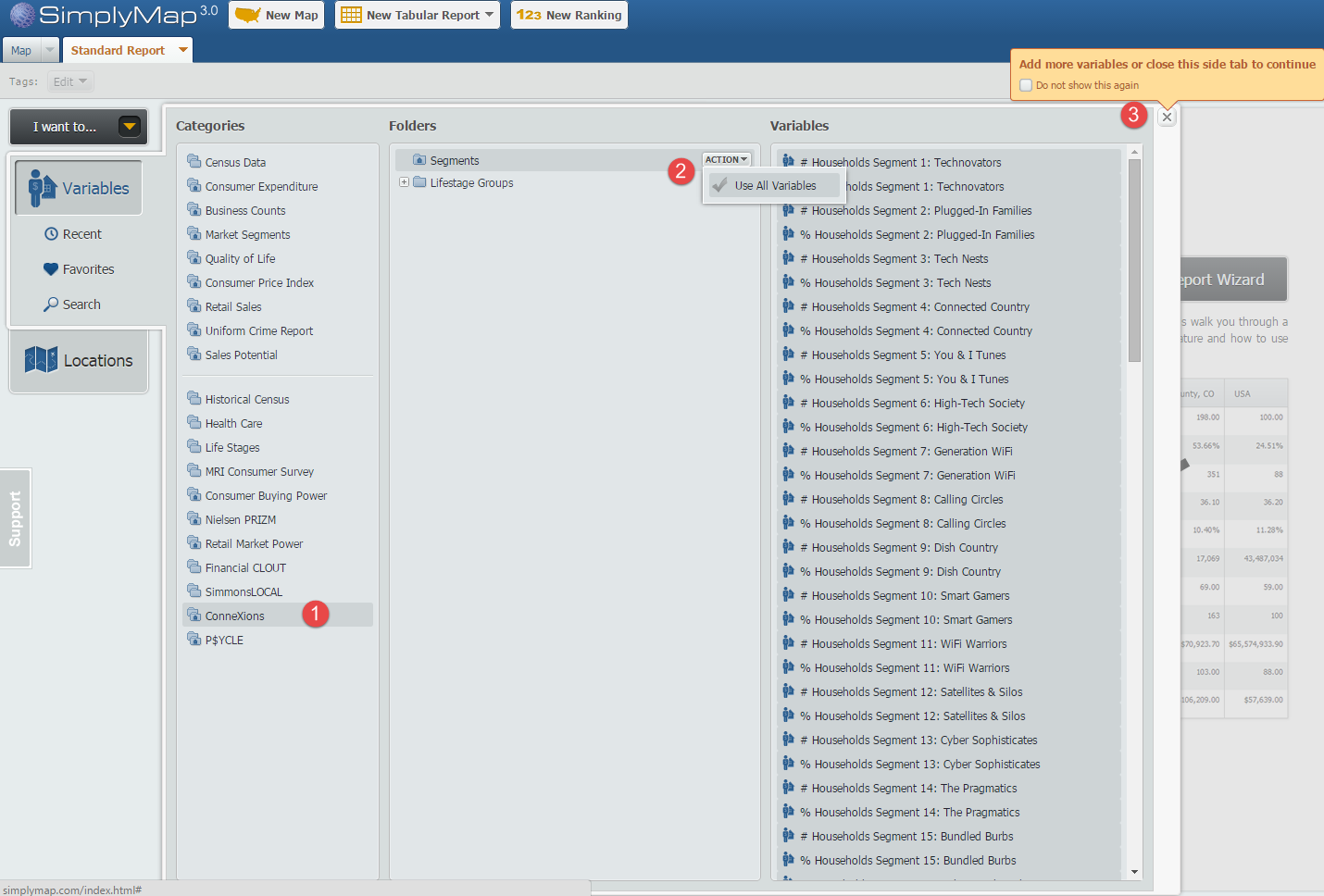
Step 3: Click on the Variables panel and select the ConneXions® folder. Click on Segments and select “Use All Variables” from the Actions dropdown. Close out the Locations panel to generate your report.
Step 4: To view the highest segment in the city of Austin, hover over the city and select Sort Descending from the actions dropdown that appears.
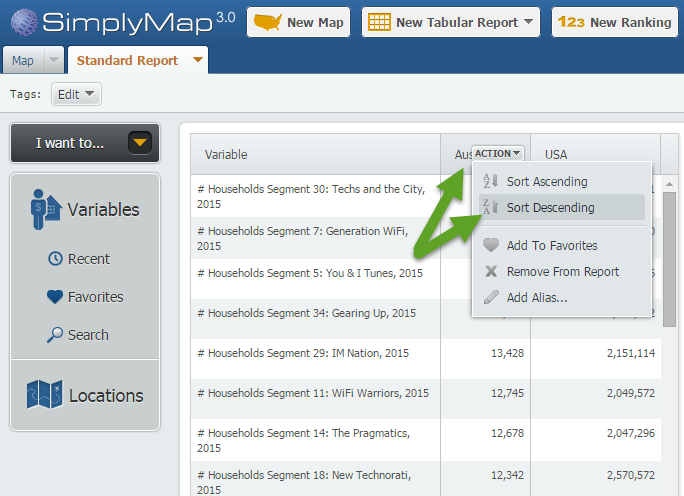
It looks like the largest segment for Austin is Segment 30: Techs and the City. To read about the segment, hover over the variable and select “View Metadata” - below is an excerpt of this segment’s metadata:
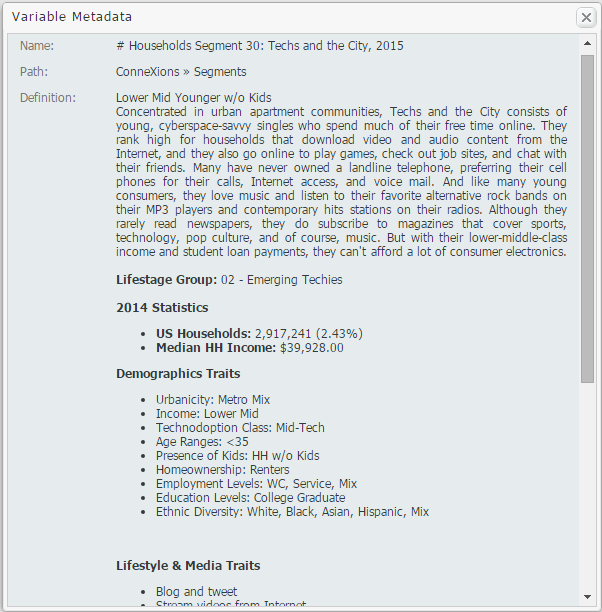
We repeated the process for the cities of Miami and Atlanta to see what their top segments were. Atlanta had a similar result to Austin, with "You & iTunes" as the top segment, but Miami's "Last to Adopt" segment was most prevalent, reflecting an older average population. Log in to SimplyMap to run your own local analysis - share your results in the comments!
We hope you enjoyed this week’s SimplyMap report. Don’t forget to follow us on Twitter and Like Us on Facebook to keep up to date on all things SimplyMap.
If the institution you are associated with subscribes to SimplyMap and would like a free trial of this data module, please feel free to email: support@geographicresearch.com with your request.
More from SimplyAnalytics


Posted on Apr 10, 2015 by Admin
In this week’s SimplyMap report, we explore one of the newer datasets available: Retail Market Power®. What is it? In short, the Retail Market Power® dataset helps users identify opportun...
Posted on Jan 05, 2018 by Admin
The SimplyAnalytics team is looking forward to exhibiting at the Ontario Library Association Super Conference 2018! Stop by the SimplyAnalytcs booth (115T) and take a look at our newest o...
Posted on Jun 08, 2015 by Admin
In this week’s report we take a look at one folder found within SimplyMap’s SimmonsLOCAL data package. SimmonsLOCAL is a powerful targeting and profiling system that provides insights int...
Posted on Dec 02, 2019 by Admin
Hi everybody! We’re back this week with another question from our Help Desk. This time featuring SimplyAnalytics Canada. Let’s get started! Question: How can I analyze all of the PRIZM5 s...
Posted on Oct 07, 2024 by Admin
We're headed to Charleston! Come visit the SimplyAnalytics team on November 12th at the Gaillard Center at booth 41. We'll be doing live demonstrations of the database, answering question...
Posted on Mar 04, 2014 by Admin
March 11-15 Indianapolis, Indiana The Public Library Association is prepared for another week of events, workshops and special appearances for librarians and authors. Visit our exh...
Posted on Nov 11, 2014 by Admin
With Veteran’s Day in the US this week, we thought it would be an ideal time to explore some of the variables in SimplyMap that pertain to veterans. Specifically, we wanted to know which ...
Posted on Mar 18, 2015 by Admin
Can you guess which US city has the most residents per square mile? Today we’re going to use SimplyMap to answer this question for all cities, as well as cities with a population greater ...
Posted on Sep 05, 2019 by Admin
SimplyAnalytics will be exhibiting at the biennial North Carolina Library Association conference, to be held this year at the Winston-Salem Benton Convention Center. If you are attending,...
Posted on May 23, 2019 by Admin
Come visit the SimplyAnalytics team at the Special Library Association's Annual Conference in Cleveland. Special librarians and other information professionals come together at SLA’s annu...